
网格中的面积乐趣
几何画板及绘图内容加载中,请稍等……
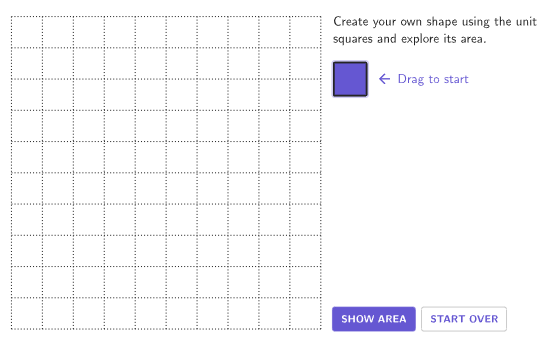
本范例通过在网格上使用单位正方形构建图形,探索矩形、正方形和组合图形的面积。①本范例演示如何在网格上构建图形并计算其面积;②涉及的核心数学概念包括面积计算、单位正方形、非标准单位和标准单位;③作图要点使用了GeoGebra命令如Zip, PointToPixels, Flatten, Sequence, centerBox, Polygon, Remove, IsInRegion, Element, If, Vector, Sort, Length, Corner等;④适合4-5年级学生,用于学习使用网格和标准单位确定矩形、正方形和组合图形的面积。
GeoGebra 命令及参数
Zip(If[Mod[A, 10] ≟ 0, 20, 0] + Mod[A, 10] + ((9 - Div[A, 10]) * 10), A, filledIndex) → filledIndexReversePointToPixels(Corner[1], Corner[3], Corner[5], startPt) → StartPixelsFlatten(Sequence[Sequence[(Mod[A, gridMaxX], Mod[B, gridMaxY]), A, 0, gridMaxX - 1], B, 0, gridMaxY - 1]) → AllBoxPointsZip(Element[AllBoxPoints, A], A, filledIndex) → filledBoxPointsSequence(false, k, 1, 100) → falseListcenterBox(boxWidth, boxHeight, moveablePt) → moveableBoxcenterBox(boxWidth, boxHeight, startPt) → startBoxPolygon((0, 0) - (boxWidth / 2, boxHeight / 2), (gridMaxX, 0) - (boxWidth / 2, boxHeight / 2), (gridMaxX, gridMaxY) - (boxWidth / 2, boxHeight / 2), (0, gridMaxY) - (boxWidth / 2, boxHeight / 2)) → Region, f, g, h, iRemove(KeepIf[0 < x < (gridMaxX * gridMaxY) + 1, Unique[Flatten[Zip[If[Mod[A, 10] ≟ 1, {A + gridMaxX, A + 1, A - gridMaxX}, If[Mod[A, 10] ≟ 0, {A + gridMaxX, A - gridMaxX, A - 1}, {A + gridMaxX, A + 1, A - gridMaxX, A - 1}]], A, filledIndex]]]], filledIndex) → adjIndexZip(Element[AllBoxPoints, A], A, adjIndex) → adjPointsZip(Distance[A, closestIntPoint], A, adjPoints) → distanceListIsInRegion(moveablePt, Region) → inRegionElement(adjIndex, IndexOf[Min[distanceList], distanceList]) → minIndexIf(currentIndex ≟ 0, startPt, Element[AllBoxPoints, currentIndex]) → endPointVector(moveablePt, endPoint) → TransVeccenterBox(boxHeight, boxWidth, moveablePt + (animatePoint * (x(TransVec), y(TransVec)))) → movingBoxZip(If[A, "colorPurpleButton", "colorGreyInactiveButton"], A, boxList) → colorBoxesRemove(AllBoxPoints, filledBoxPoints) → greyBoxPointsZip(centerBox[boxHeight, boxWidth, A], A, greyBoxPoints) → greyBoxesZip(centerBox[boxHeight - gap, boxWidth - gap, A], A, filledBoxPoints) → filledBoxesSequence(Segment[(((-boxWidth)) / 2, ((-boxHeight)) / 2) + (A * (boxWidth, 0)), (((-boxWidth)) / 2, gridMaxY - boxHeight / 2) + (A * (boxWidth, 0))], A, 1, gridMaxX - 1) → verticalLinesSequence(Segment[(((-boxWidth)) / 2, ((-boxHeight)) / 2) + (A * (0, boxHeight)), (((-boxWidth)) / 2 + gridMaxX, ((-boxHeight)) / 2) + (A * (0, boxHeight))], A, 1, gridMaxY - 1) → horizontalLinesSort(filledIndex, filledIndexReverse) → sortedFilledIndexZip(Element[AllBoxPoints, A], A, Take[sortedFilledIndex, 1, fillArea]) → showAreaBoxPointsZip(centerBox[boxHeight - gap, boxWidth - gap, A], A, showAreaBoxPoints) → showAreaFilledBoxesLength(filledIndex) → areaZip(centerBox[boxHeight, boxWidth, A], A, Remove[filledBoxPoints, showAreaBoxPoints]) → emptyBoxOutlineCorner(5) → corner5onboardingTextOffset(Corner[onboardingText, 1], Corner[onboardingText, 3], 1, Corner[1], Corner[3], Corner[5]) → OnboardingTextOffsetexpandQuad(Vertex[moveableBox, 1], Vertex[moveableBox, 2], Vertex[moveableBox, 3], Vertex[moveableBox, 4], (7 * pulsing), Corner[1], Corner[3], Corner[5]) → pulsingSquareIf(area ≟ 1, "", "s") → sText
AI 绘图提示语参考
在网格上绘制一个可交互的面积探索图形。网格由等宽等高的正方形单元格组成,覆盖一个矩形区域。部分单元格被填充为紫色,表示已选中的单位方块,其余为灰色。一个可拖动的方块用于选择或取消单元格,选中后填充区域会高亮显示。图形包含网格线、单元格轮廓以及一个显示当前选中面积的文本标签。整体用于演示矩形、正方形和组合图形的面积计算,支持通过拖动改变填充范围。
以上提示语为根据原始绘图命令整理而来,仅供参考。