
安德烈螺旋:基于旋转与勾股定理的几何构造
几何画板及绘图内容加载中,请稍等……
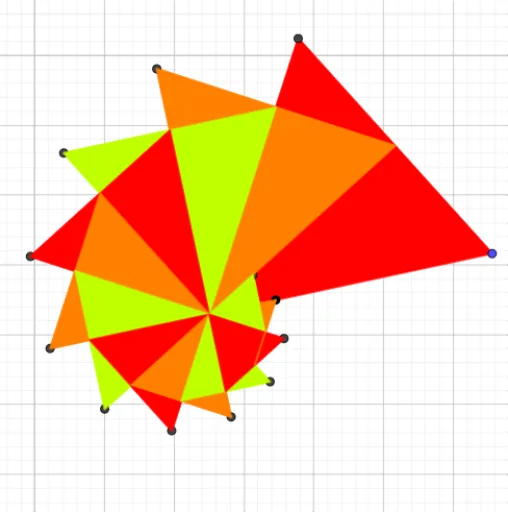
该范例演示了一个由多个多边形嵌套旋转形成的螺旋状几何图形,通过不断构造直角三角形并旋转生成新的多边形,最终形成视觉上的螺旋结构。核心数学概念包括旋转(Rotation)、勾股定理(Pythagorean Theorem)、几何变换(Geometric Transformations)以及分数(Fractions)在比例中的应用。作图要点:使用GeoGebra命令Polygon创建初始多边形,OrthogonalLine构造垂线,Intersect求交点,Point定义关键点;对象包括A、B、poly1等,通过反复执行垂线、交点、多边形命令,逐步生成poly2至poly7,形成螺旋链。适合中学阶段学习几何变换、勾股定理应用以及动态几何作图的学生,也可用于教师演示旋转与比例关系。
GeoGebra 命令及参数
Polygon(A, B, 3) → poly1, f, g, h, COrthogonalLine(A, g) → iIntersect(i, g) → DPolygon(A, D, 3) → poly2, j, k, l, EIntersect(h, k) → FPolygon(A, F, 3) → poly3, m, n, p, GIntersect(l, n) → HPolygon(A, H, 3) → poly4, q, r, s, IIntersect(p, r) → JPolygon(A, J, 3) → poly5, t, a, b, KIntersect(s, a) → LPolygon(A, L, 3) → poly6, c, d, e, MIntersect(b, d) → NPolygon(A, N, 3) → poly7, f_1, g_1, h_1, OPoint(e) → PPolygon(A, P, 3) → poly8, i_1, j_1, k_1, QIntersect(h_1, j_1) → RPolygon(A, R, 3) → poly9, l_1, m_1, n_1, SIntersect(k_1, m_1) → TPolygon(A, T, 3) → poly10, p_1, q_1, r_1, UIntersect(n_1, q_1) → VPolygon(A, V, 3) → poly11, s_1, t_1, a_1, WIntersect(r_1, t_1) → ZPolygon(A, Z, 3) → poly12, b_1, c_1, d_1, A_1