
五级数字游戏
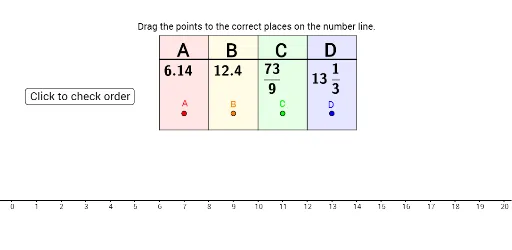
几何画板及绘图内容加载中,请稍等……
这个范例演示了如何通过四个数字进行各种运算,涉及分数、等腰三角形、利息计算、函数图像等核心数学概念。通过使用RandomElement、If、Polygon、Segment等GeoGebra命令,可以构造出一个互动的数学游戏。适合小学五年级学生进行数学练习和探索。
GeoGebra 命令及参数
RandomElement(possibleDecimals) → ARandomElement(Remove[possibleDecimals, {A}]) → BRandomElement({2, 3, 4, 5, 6, 7, 8, 9, 10, 11, 12}) → CdenomIf(Cdenom ≟ 2, Random[0, 40, true], If[Cdenom ≟ 3, Random[0, 60, true], If[Cdenom ≟ 4, Random[0, 80, true], If[Cdenom ≟ 5, Random[0, 100, true], If[Cdenom ≟ 6, Random[0, 120, true], If[Cdenom ≟ 7, Random[0, 140, true], If[Cdenom ≟ 8, Random[0, 160, true], If[Cdenom ≟ 9, Random[0, 180, true], If[Cdenom ≟ 10, Random[0, 200, true], If[Cdenom ≟ 11, Random[0, 220, true], If[Cdenom ≟ 12, Random[0, 240, true]]]]]]]]]]]) → CnumPolygon(I + (10, 0), W + (10, 0), V + (10, 0), J + (10, 0)) → poly1, g, h, i, jPolygon(J + (10, 0), V + (10, 0), U + (10, 0), K + (10, 0)) → poly2, k, n, p, qPolygon(K + (10, 0), U + (10, 0), T + (10, 0), L + (10, 0)) → poly3, l, r, t, aPolygon(L + (10, 0), T + (10, 0), S + (10, 0), M + (10, 0)) → poly4, m, s, b, f_1Segment(H, G) → cSegment(G, Z) → dSegment(Z, E) → eSegment(E, F) → fFractionText(C) → CfancyRandom(1, 19) → DwholeRandomElement({2, 3, 4, 5, 6, 7, 8, 9, 10, 11, 12}) → DdenomRandom(1, Ddenom - 1, true) → DnumFractionText(Dnum / Ddenom) → DfancyIf(Dwhole < 0, Dwhole - Dnum / Ddenom, Dwhole + Dnum / Ddenom) → DSegment(A_1, Aact) → aerrSegment(B_1, Bact) → berrSegment(C_1, Cact) → cerrSegment(D_1, Dact) → derrSort({A, B, C, D}) → testSort({x(A_1), x(B_1), x(C_1), x(D_1)}) → test2If(IndexOf[A, Sort[{A, B, C, D}]] ≟ IndexOf[x(A_1), Sort[{x(A_1), x(B_1), x(C_1), x(D_1)}]], 1) → orderAIf(IndexOf[B, Sort[{A, B, C, D}]] ≟ IndexOf[x(B_1), Sort[{x(A_1), x(B_1), x(C_1), x(D_1)}]], 1) → orderBIf(IndexOf[C, Sort[{A, B, C, D}]] ≟ IndexOf[x(C_1), Sort[{x(A_1), x(B_1), x(C_1), x(D_1)}]], 1) → orderCIf(IndexOf[D, Sort[{A, B, C, D}]] ≟ IndexOf[x(D_1), Sort[{x(A_1), x(B_1), x(C_1), x(D_1)}]], 1) → orderD