
Write the Equation of a Line Practice
Loading the math board and drawing, please wait…
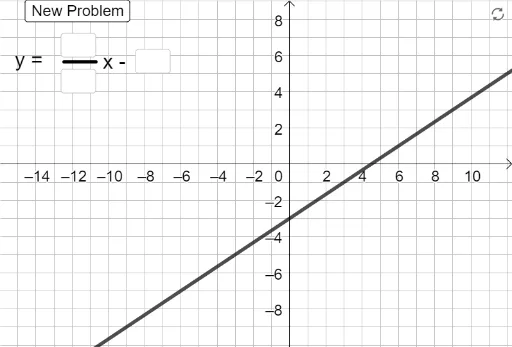
This example demonstrates how to write the equation of a line based on given characteristics. Key mathematical concepts include linear equations, slope, and y-intercept. Using GeoGebra commands such as FromBase, Random, and RandomElement, users can dynamically adjust the slope and y-intercept of a line to practice writing linear equations. Suitable for middle school and above students or teachers.
GeoGebra Commands & Parameters
FromBase(d_1, 10) → d_2FromBase(n_1, 10) → n_2Random(-6, 6) → bRandomElement({1 / 2, 2 / 3, 3 / 4, 3 / 5, -1 / 2, -2 / 3, -3 / 4, -3 / 5}) → aIf(b > -1, "x +", "x -") → If(a > -1, "+", "-")Textfield(n_1) → InputBox1FromBase(b_1, 10) → b_2Textfield(d_1) → InputBox2If(a ≥ 0, "y = ", "y = -") → t_1Textfield(b_1) → InputBox3If(a ≥ 0 ∧ n_2 / d_2 ≠ a, "Check your slope", "") → Sol_1If(b ≥ 0 ∧ b_2 ≠ b, "Check your y-intercept", "") → Sol_3If(b ≥ 0, (((-n_2)) / d_2 * x) + b_2, (((-n_2)) / d_2 * x) - b_2) → g_1If(b ≥ 0, (a_2 * x) + b_2, (a_2 * x) - b_2) → gIf(b < 0 ∧ b_2 ≠ abs(b), "Check your y-intercept", "") → Sol_4If(a ≥ 0 ∧ g ≟ f, "Good Job!", "") → text1If(a < 0 ∧ g_1 ≟ f, "Good Job!", "") → text3If(a < 0 ∧ n_2 / d_2 ≠ abs(a), "Check your slope", "") → Sol_2
AI Drawing Prompt Reference
Draw a coordinate plane with a line whose slope is randomly chosen from a set of fractions and whose y-intercept is randomly generated between -6 and 6. Place three input boxes beside the graph for entering the slope, intercept, and full equation. When the input is correct, display "Good Job!"; if the slope or intercept is wrong, show corresponding hint text. The line equation is displayed as "y = ax + b" where a and b are random values, and the signs adjust when a or b is negative.
The prompt above was compiled from the original drawing commands and is for reference only.