
Wineglass Volume Calculation Example
Loading the math board and drawing, please wait…
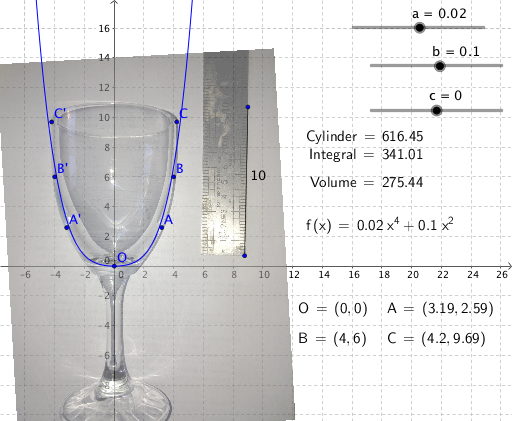
This example demonstrates how to calculate the volume of an irregular wineglass using integral calculus. It involves core mathematical concepts such as integral computation, curve sketching, straight line equations, and algebra. GeoGebra commands like Segment, LaTeX, and objects including Cylinder, parameters a, b, c, f, Integral, J, K, pic1, O, F, G, e, A, B, C, text elements, and more are used for parametric modeling and computation. Suitable for high school students and educators focusing on integral applications.
GeoGebra Commands & Parameters
Segment(F, G) → eLaTeX(C, true, true) → text1LaTeX(O, true, true) → text2LaTeX(A, true, true) → text3LaTeX(B, true, true) → text4LaTeX(f, true, true) → text5LaTeX(Integral, true, true) → text6LaTeX(Volume, true, true) → text7LaTeX(Cylinder, true, true) → Cylinder_1
AI Drawing Prompt Reference
Draw an example of calculating the volume of an irregular wineglass using integral calculus, including the wineglass outline, integral curves, straight line equations, and parameters a, b, c, f. Label the calculation process with integral symbols and formulas, and display the volume result. Start by sketching the wineglass outline and straight line, then add integral curves and formulas, and finally label the volume result and parameter values.
The prompt above was compiled from the original drawing commands and is for reference only.