
Which Average is Most Appropriate? Interactive Central Tendency Practice
Loading the math board and drawing, please wait…
In collections
Mittelmaße berechnen und interpretieren
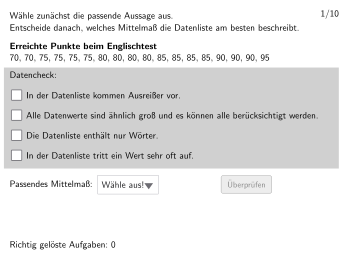
This interactive practice helps students understand and compare three measures of central tendency: arithmetic mean, mode, and median. Students can input data, observe characteristics of different averages, and learn to choose the most appropriate average type based on data distribution. Construction uses Textfield and InputBox for data collection, Shuffle for randomizing questions, If conditions for answer validation, with attemptCount and correctCount tracking progress. Suitable for grades 5-6, develops data analysis and statistical thinking skills.
GeoGebra Commands & Parameters
Textfield(input1) → InputBox1Textfield(input2) → InputBox2Shuffle({1, 2, 3, 4, 5, 6, 7, 8, 9, 10}) → randomBsp, {2, 8, 3, 6, 9, 5, 7, 4, 10, 1}SelectedIndex(list1) → index1IndexOf(true, checks) → index2If(check1, C, If[check2, D, If[check3, E, If[check4, F]]]) → PosIf(check1, C1, If[check2, D1, If[check3, E1, If[check4, F1]]]) → Pos1Polygon(PtopLeftCornerFeedback, PtopRightCornerFeedback, PbottomRightCornerFeedback, PbottomLeftCornerFeedback) → rectangleCorrect, rectangleCorrectS3, rectangleCorrectS4, rectangleCorrectS2, rectangleCorrectS1Polygon(box1, box2, box3, box4) → q1, g, h, i, jIf(corList2(bsp) ≟ 1, C, If[corList2(bsp) ≟ 2, D, If[corList2(bsp) ≟ 3, E, If[corList2(bsp) ≟ 4, F]]]) → PosSolIf(corList2(bsp) ≟ 1, C1, If[corList2(bsp) ≟ 2, D1, If[corList2(bsp) ≟ 3, E1, If[corList2(bsp) ≟ 4, F1]]]) → Pos1SolPolygon(PtopLeftCornerFeedbackSol, PtopRightCornerFeedbackSol, PbottomRightCornerFeedbackSol, PbottomLeftCornerFeedbackSol) → rectangleSol, ptopleftcornerfeedbacksol, ptoprightcornerfeedbacksol, pbottomrightcornerfeedbacksol, pbottomleftcornerfeedbacksol
AI Drawing Prompt Reference
This is a graphical tool for a statistics practice, with three input boxes for data entry and a shuffled list of questions. Users select a question and choose the correct answer, which displays a rectangle and feedback areas for correct or incorrect responses.
The prompt above was compiled from the original drawing commands and is for reference only.