
Weltenburg Monastery Ceiling Oval Construction
Loading the math board and drawing, please wait…
In collections
circles, ovals, ellipses and architecture
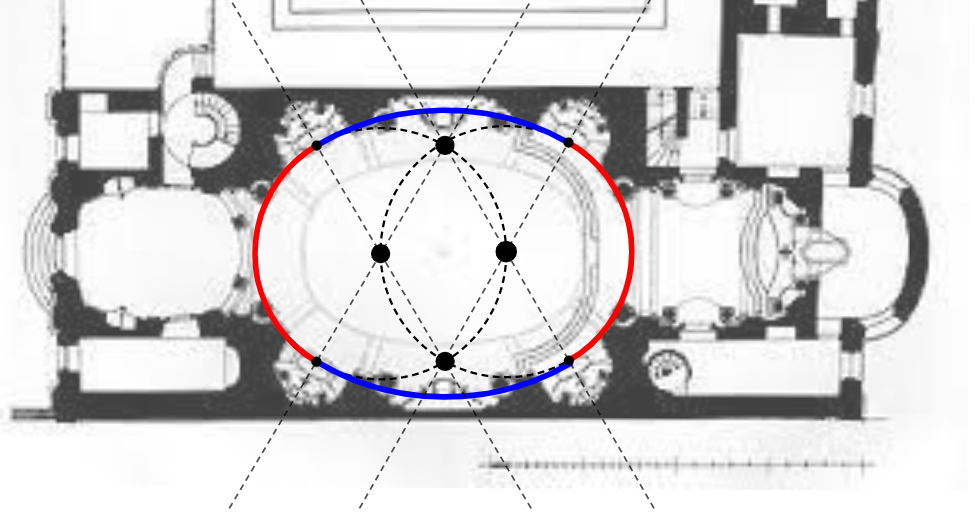
This example demonstrates constructing an oval opening in a ceiling, mimicking the design of the Weltenburg Monastery church, using GeoGebra. It involves core concepts like ellipses, perpendicular bisectors, intersections, circles, and arcs. Key GeoGebra commands used include LineBisector, Intersect, Circle, and CircleArc. Suitable for high school geometry construction lessons to understand ellipse properties.
GeoGebra Commands & Parameters
LineBisector(C, D) → fLineBisector(F, G) → gLineBisector(C, D) → hLineBisector(G, F) → iLineBisector(H, J) → jLineBisector(K, L) → kIntersect(j, k) → MIntersect(h, i) → NCircle(M, N) → cCircle(N, M) → dIntersect(c, j, 1) → OIntersect(d, h, 2) → PIntersect(d, i, 1) → RIntersect(c, k, 1) → SCircleArc(N, R, P) → eCircleArc(M, O, S) → pIntersect(i, k) → TIntersect(c, d, 2) → UCircleArc(U, P, O) → qCircleArc(T, S, R) → r
AI Drawing Prompt Reference
Draw an oval opening in a ceiling, similar to the design of the Weltenburg Monastery church. The figure should include an oval opening, along with circles and arcs around it. The construction order should start by drawing two perpendicular lines, then finding their intersection, followed by drawing circles and arcs, and finally connecting these elements to form the complete oval opening.
The prompt above was compiled from the original drawing commands and is for reference only.