
Wave Transformation Demo
Loading the math board and drawing, please wait…
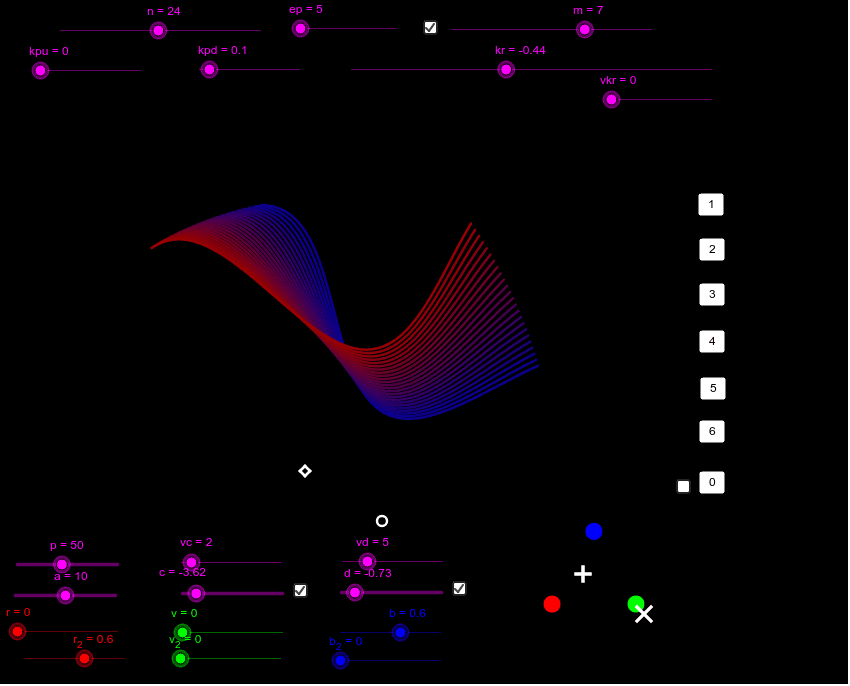
This example demonstrates the transformation of a sine function graph through translation and rotation in a plane. It involves core mathematical concepts such as trigonometry, translation, rotation, line segments, and equilateral triangles. Key GeoGebra commands/objects used include CurveCartesian, Vector, Sequence, Element, Circle, Intersect, and Segment. Suitable for high school students studying analytical geometry and trigonometric transformations.
GeoGebra Commands & Parameters
CurveCartesian(t, f(t), t, If[bm, ((-π) * m), 0], (π * m)) → gVector(A, C) → uSequence(Translate[Rotate[g, ((((kpu + kpd) * i) * 2) * π) + kr], Vector[(i * u)]], i, 1 / n, 1, 1 / n) → liste2Element(liste2, 1) → c1Element(liste2, 2) → c2Element(liste2, 3) → c3Element(liste2, 4) → c4Element(liste2, 5) → c5Element(liste2, 6) → c6Element(liste2, 7) → c7Element(liste2, 8) → c8Element(liste2, 9) → c9Element(liste2, 10) → c10Element(liste2, 11) → c11Element(liste2, 12) → c12Element(liste2, 13) → c13Element(liste2, 14) → c14Element(liste2, 15) → c15Element(liste2, 16) → c16Element(liste2, 17) → c17Element(liste2, 18) → c18Element(liste2, 19) → c19Element(liste2, 20) → c20Element(liste2, 21) → c21Element(liste2, 22) → c22Element(liste2, 23) → c23Element(liste2, 24) → c24Element(liste2, 25) → c25Element(liste2, 26) → c26Element(liste2, 27) → c27Element(liste2, 28) → c28Element(liste2, 29) → c29Element(liste2, 30) → c30Element(liste2, 31) → c31Element(liste2, 32) → c32Element(liste2, 33) → c33Element(liste2, 34) → c34Element(liste2, 35) → c35Element(liste2, 36) → c36Element(liste2, 37) → c37Element(liste2, 38) → c38Element(liste2, 39) → c39Element(liste2, 40) → c40Element(liste2, 41) → c41Element(liste2, 42) → c42Element(liste2, 43) → c43Element(liste2, 44) → c44Element(liste2, 45) → c45Element(liste2, 46) → c46Element(liste2, 47) → c47Element(liste2, 48) → c48Circle(R, V) → eCircle(V, R) → hIntersect(e, h) → B, B_1, ,Circle(B, R) → kSegment(D, R) → drSegment(D, V) → dvSegment(D, B) → dbSegment(R, V) → rvSegment(E, R) → erSegment(E, V) → evSegment(E, B) → ebVector(Pt, C) → wVector(Pt, A) → zVector(Pc, E) → iVector(Pc, D) → j
AI Drawing Prompt Reference
Draw a sine function graph and then translate and rotate it using vectors to demonstrate the transformation process, including multiple translated and rotated images of the function graph, along with the vectors and parallelograms used for the transformations, finally connecting these images with line segments to form a complete transformation demonstration.
The prompt above was compiled from the original drawing commands and is for reference only.