
Watt's Linkage
Loading the math board and drawing, please wait…
In collections
Linkages
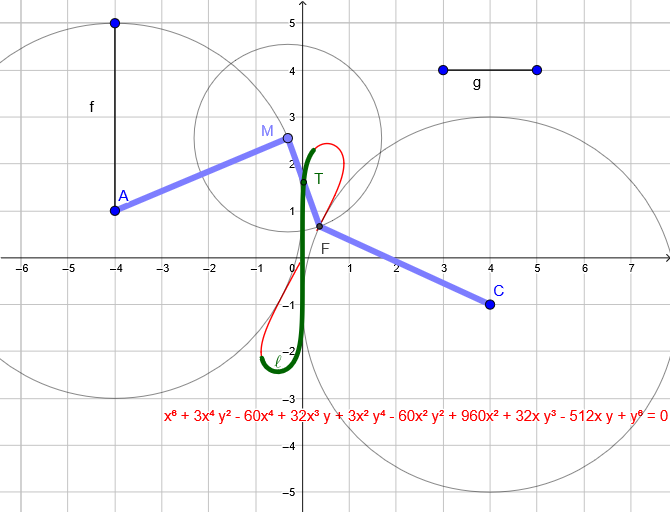
Watt's linkage is a mechanical device that uses the motion of linkages to achieve specific trajectory patterns. This example demonstrates the motion principles of the linkage mechanism through geometric construction, involving circles, loci, and geometric transformations. It uses commands like Segment, Circle, Point, Intersect, Midpoint, Locus, and LocusEquation in GeoGebra. Suitable for high school mathematics education and mechanical engineering learning.
GeoGebra Commands & Parameters
Segment(D, E) → gCircle(A, B) → ePoint(e) → MSegment(A, B) → fCircle(M, g) → cCircle(C, f) → dIntersect(c, d, 2) → FSegment(M, F) → hSegment(F, C) → iMidpoint(h) → TSegment(A, M) → jLocus(T, M) → lLocusEquation(T, M) → a
AI Drawing Prompt Reference
Construct a planar geometric setup using fixed points A, B, C, D and a segment between D and E. Draw the circle determined by A and B, and take a point M on that circle. Create a circle centered at M with a radius tied to the segment AB, and another circle centered at C with the corresponding radius tied to that same construction; let these two circles intersect at F. Connect M to F and connect F to C, then take T as the midpoint of segment MF. Finally, plot the locus/trajectory of T with respect to M and present it as a locus equation to illustrate the linkage’s motion pattern through circles, intersections, midpoints, and the resulting curve.
The prompt above was compiled from the original drawing commands and is for reference only.