
Volumes of Revolution, Washers, Variable Axis
Loading the math board and drawing, please wait…
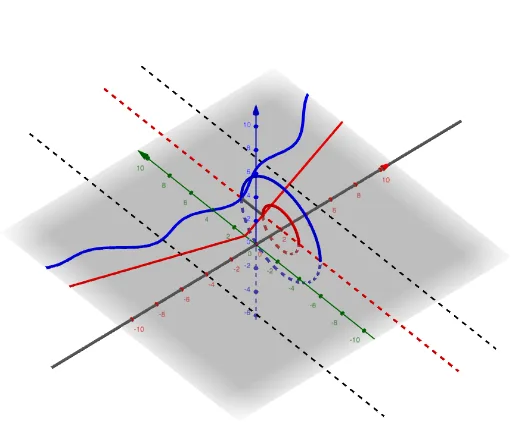
This example demonstrates the calculation of volumes of revolution using the washer method, while also showing the effect of a variable axis on the volume. Key mathematical concepts include integration, volume of solids of revolution, washer method, function graphs, and geometric transformations. It is constructed using GeoGebra commands and objects such as Intersect, Segment, Textfield, CurveCartesian, Surface, and Circle. Suitable for high school students and above to learn and understand volume calculation methods in calculus and the application of geometric transformations.
GeoGebra Commands & Parameters
Intersect(f, i, (2, 3.65646239769827)) → AIntersect(i, xAxis) → BSegment(A, B) → jSegment(A, B) → lTextfield(f) → InputBox1CurveCartesian(t, f(t), t, a, b) → dSurface(d, p, m) → eIntersect(g, i, (2, 1.6666666666666665)) → CSegment(A, C) → nCurveCartesian(t, g(t), t, a, b) → oSurface(o, p, m) → sTextfield(g) → InputBox2CurveCartesian(a, (t * f(a)) + ((1 - t) * g(a)), t, 0, 1) → tSurface(t, p, m) → uCurveCartesian(b, (t * f(b)) + ((1 - t) * g(b)), t, 0, 1) → vSurface(v, p, m) → wCircle(m, A) → cCircle(m, C) → q
AI Drawing Prompt Reference
Draw a function graph to demonstrate the calculation of volumes of revolution, including inner and outer function curves and a rotation axis, with washers to represent the volume of the solid of revolution, and show the effect of different rotation axes on the volume. Start by plotting the inner and outer function curves and the rotation axis, then generate the surfaces of revolution, and finally use washers to represent the volume difference.
The prompt above was compiled from the original drawing commands and is for reference only.