
Volume Unit Conversion Practice: Decimal Number Application
Loading the math board and drawing, please wait…
In collections
Wiederholung: Flächen- und Raummaße
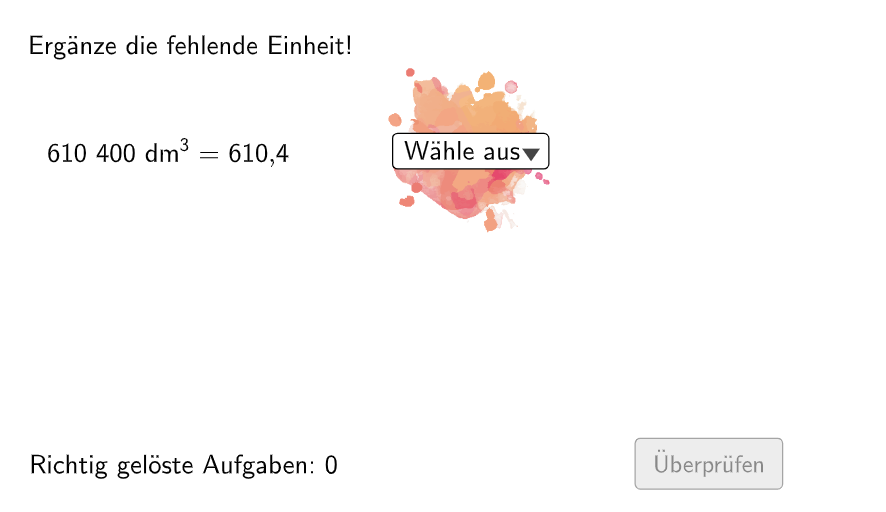
This is an interactive exercise for practicing volume unit conversions using decimal numbers, helping students master conversions between cubic meters, liters, milliliters and other volume units. The core mathematical concepts include understanding place value of decimal numbers, the conversion rates between volume units (1 cubic meter = 1000 liters = 1,000,000 milliliters), and calculation methods for unit conversions. Construction details: The exercise uses the Shuffle command to generate random problems, Element and IndexOf commands to select conversion factors from predefined lists, If conditions to handle different conversion logics, Textfield for student answer input, and Polygon to draw feedback areas. Suitable for grade 5 students' classroom practice or homework reinforcement, and can also serve as a tool for teachers to assess students' unit conversion skills.
GeoGebra Commands & Parameters
Shuffle(Sequence[Random[1, 2], i, 1, 100]) → ListeFaktoren, {1, 2, 1, 2, 1, 1, 1, 1, 1, 2, 1, 1, 2, 2, 1, 1, 1, 2, 1, 2, 2, 1, 2, 1, 1, 2, 1, 1, 2, 1, 2, 2, 1, 1, 2, 1, 1, 1, 2, 2, 2, 2, 1, 1, 2, 1, 1, 1, 2, 1, 2, 1, 2, 1, 2, 1, 1, 1, 1, 1, 2, 2, 1, 1, 1, 1, 2, 1, 1, 2, 2, 2, 2, 1, 1, 2, 1, 2, 2, 1, 2, 2, 2, 1, 2, 2, 2, 2, 2, 1, 1, 1, 2, 1, 1, 2, 2, 1, 1, 2}Element(ListeFaktoren, Mod[questionCount, 100]) → positionFaktor0Shuffle(Sequence[Random[111, 9999], i, 1, 100]) → randomNosForX, {4034, 6104, 9678, 8824, 2628, 3137, 668, 3783, 7520, 1500, 5496, 9968, 8271, 7997, 540, 9279, 8307, 4017, 7320, 3020, 7567, 7572, 591, 4537, 2723, 9414, 6208, 3947, 7838, 7812, 4244, 5115, 3193, 1269, 7026, 8789, 5884, 866, 3030, 4758, 5647, 673, 1882, 7430, 4260, 7604, 8322, 9684, 9126, 9507, 4439, 2896, 6949, 4256, 8548, 6750, 4905, 638, 9961, 9785, 7128, 4744, 4168, 4151, 2279, 7474, 1471, 1698, 4274, 2272, 1819, 4501, 6460, 5891, 3095, 7549, 3983, 2956, 5573, 8102, 3642, 8932, 7617, 3691, 9718, 1168, 5246, 441, 857, 7568, 5527, 7486, 2776, 9652, 9008, 3683, 7750, 7770, 4541, 9319}Append(true, Sequence[If[randomNosForX(i) ≟ randomNosForX(i - 1), false, true], i, 2, 100]) → stayXRemove(Sequence[If[stayX(i), randomNosForX(i), 0], i, 1, 100], Sequence[0, i, 1, 100]) → randomNosForXwithoutRepeatElement(randomNosForXwithoutRepeat, Mod[questionCount, Length[randomNosForXwithoutRepeat]] + 1) → numXwithoutRepeatJoin(Sequence[Shuffle[{true, false}], i, 1, 50]) → ListeWWGroßAufKleinElement(ListeWWGroßAufKlein, Mod[questionCount, 100]) → großAufKleinJoin(Sequence[Shuffle[{1, 2, 3, 4}], i, 1, 20]) → ListeBeispielCountElement(ListeBeispielCount, Mod[questionCount, 100]) → BeispielCountIf(allowDecimalNumbers, Element[If[großAufKlein, ListeKommaGroßAufKlein, ListeKommaKleinAufGroß], BeispielCount], Element[If[großAufKlein, ListeGroßAufKlein, ListeKleinAufGroß], BeispielCount]) → BeispielElement(Element[Beispiel, 3], positionFaktor0) → faktor0If(großAufKlein, Element[Beispiel, 4], 1 / Element[Beispiel, 4]) → faktorCorrectElement(Beispiel, 2) → einheit2IndexOf(SelectedElement[LL], LL) → EinheitGewähltElement(Beispiel, 1) → einheit1NumberSeperation(num) → NumSeperatedNumberSeperation(numCorrect) → TextNumCorrectTextfield(aInput) → InputBox1Textfield(bInput) → InputBox2Polygon(PtopLeftCornerFeedback, PtopRightCornerFeedback, PbottomRightCornerFeedback, PbottomLeftCornerFeedback) → rectangleCorrect, ptopleftcornerfeedback, ptoprightcornerfeedback, pbottomrightcornerfeedback, pbottomleftcornerfeedbackElement(randomNosForX, Mod[questionCount, 100] + 1) → numXTake(("" * (num - numVorKomma1)), 3) → numNachKomma1Take(("" * (numCorrect - numVorKomma2)), 3) → numNachKomma2Corner(Text2, 3) → ACorner(Text2, 2) → D
AI Drawing Prompt Reference
Draw an interactive volume unit conversion practice, including a randomly generated volume value, a conversion factor, a conversion result, and a feedback area. The volume value can be cubic meters, liters, or milliliters, the conversion factor can be 1, 2, or other values, the conversion result can be cubic meters, liters, or milliliters. The feedback area can be a rectangle, containing a correct answer and an incorrect answer.
The prompt above was compiled from the original drawing commands and is for reference only.