
Volume of a Rectangular Prism by Dylan Butcher
Loading the math board and drawing, please wait…
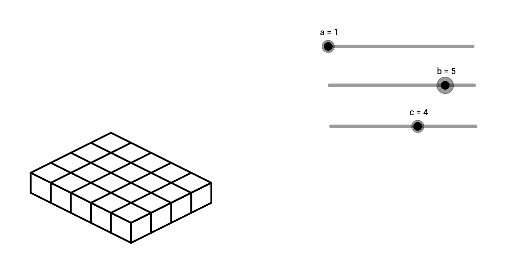
This example demonstrates the calculation of the volume of a rectangular prism using adjustable sliders for length, width, and height, dynamically showing the formula V = length × width × height. It involves core mathematical concepts like volume calculation, arithmetic operations, and matrix applications. The construction uses the Sequence command and objects such as a, b, c, list1 to list6 for parametric modeling. Suitable for middle school students and math enthusiasts learning about solid geometry and parameterized modeling.
GeoGebra Commands & Parameters
Sequence(Segment[(n, a - n / 2), (n, ((-n)) / 2)], n, 0, b) → list1Sequence(Segment[(n + b, ((-b)) / 2 + n / 2), (n + b, ((-b)) / 2 + n / 2 + a)], n, 0, c) → list2Sequence(Segment[(0, a - n), (b, ((-b)) / 2 - n + a)], n, 0, a) → list3Sequence(Segment[(b, ((-b)) / 2 + n), (b + c, ((-b)) / 2 + n + c / 2)], n, 0, a) → list4Sequence(Segment[(n, ((-n)) / 2 + a), (n + c, c / 2 - n / 2 + a)], n, 0, b) → list5Sequence(Segment[(n, a + n / 2), (n + b, a + n / 2 - b / 2)], n, 0, c) → list6
AI Drawing Prompt Reference
Draw a wireframe rectangular prism with adjustable length, width, and height. The model consists of six sets of parallel line segments forming the twelve edges, with a slanted perspective view. Generate the segments in order: first the bottom parallel slanted lines, then the vertical side slants, then the top slanted lines, and finally the connecting slanted edges between bottom and top. The result is a clear 3D oblique projection of a rectangular box, showing only edges without faces, suitable for visualizing volume changes.
The prompt above was compiled from the original drawing commands and is for reference only.