
Volume Calculation with Square Cross-Section
Loading the math board and drawing, please wait…
In collections
AP Calculus volume problems
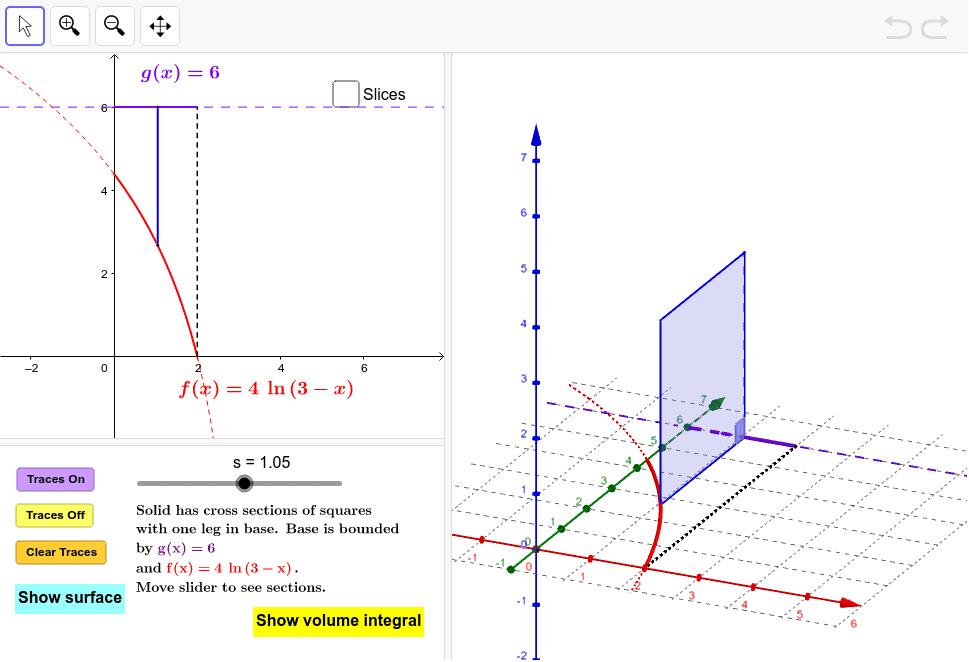
This example demonstrates the calculation of volume through varying square cross-sections. It involves core math concepts like volume computation, integration, similarity transformation, and geometric construction. GeoGebra commands such as Polygon, Segment, Angle, Locus, Integral, and Surface are used in its construction. Suitable for high school geometry and calculus education.
GeoGebra Commands & Parameters
Polygon(B, A, C, D) → Squares, a, c, d, bSegment(A, B) → eAngle(B, A, C) → αLocus(C, s) → loc1Integral((g(x) - f(x))^(2), 0, 2) → IntegIf(togDF ≟ 1, "Show Instructions", "Show volume integral") → ToggleDirectionVolumeIntegralIf(togS ≟ 1, "Hide surface", "Show surface") → ShowSurfaceLocus(D, s) → loc2Surface(u, (v * f(u)) + ((1 - v) * g(u)), 0, u, 0, 2, v, 0, 1) → BaseSurface(u, g(u), (v * (g(u) - f(u))), v, 0, 1, u, 0, 2) → SurfaceBackSurface(u, f(u), (v * (g(u) - f(u))), v, 0, 1, u, 0, 2) → SurfaceFrontSurface(u, (v * f(u)) + ((1 - v) * g(u)), g(u) - f(u), u, 0, 2, v, 0, 1) → TopSequence(Polygon[((k * h), f(((k + p) * h)), 0), ((k * h), g(((k + p) * h)), 0), ((k * h), g(((k + p) * h)), ht(((k + p) * h))), ((k * h), f(((k + p) * h)), ht(((k + p) * h)))], k, 0, m - 1) → SlicesLeftSequence(Polygon[(((k + 1) * h), f(((k + p) * h)), 0), (((k + 1) * h), g(((k + p) * h)), 0), (((k + 1) * h), g(((k + p) * h)), ht(((k + p) * h))), (((k + 1) * h), f(((k + p) * h)), ht(((k + p) * h)))], k, 0, m - 1) → SlicesRightSequence(Surface[u, f(((k + p) * h)), (v * ht(((k + p) * h))), u, (k * h), ((k + 1) * h), v, 0, 1], k, 0, m - 1) → SlicesFrontSequence(Surface[u, g(((k + p) * h)), (v * ht(((k + p) * h))), u, (k * h), ((k + 1) * h), v, 0, 1], k, 0, m - 1) → SlicesBackSequence(Surface[u, (v * f(((k + p) * h))) + ((1 - v) * g(((k + p) * h))), ht(((k + p) * h)), u, (k * h), ((k + 1) * h), v, 0, 1], k, 0, m - 1) → SlicesTopSequence(Polygon[((k * h), f(((k + p) * h))), (((k + 1) * h), f(((k + p) * h))), (((k + 1) * h), g(((k + p) * h))), ((k * h), g(((k + p) * h)))], k, 0, m - 1) → SlicesBaseSequence(If[Defined[Area[Element[SlicesLeft, k]]], Area[Element[SlicesLeft, k]], 0], k, 1, m) → AreasSegment((2, 0), (2, 6)) → i
AI Drawing Prompt Reference
Create a 3D solid figure illustrating volume calculation using square cross-sections. Two function curves on the coordinate plane enclose a region extending from x=0 to x=2. Above this region, construct a series of square cross-sections perpendicular to the x-axis, with side length equal to the vertical distance between the curves at each position. These cross-sections stack along the x-axis to form the solid. Also display the solid's base, top, front, and back surfaces, along with several discrete slices for approximation. Finally, annotate the volume integral value and include a toggleable instruction text.
The prompt above was compiled from the original drawing commands and is for reference only.