
Volume Calculation of Cubes
Loading the math board and drawing, please wait…
In collections
Geo&Alg:Area Volume Pythagorean Th.
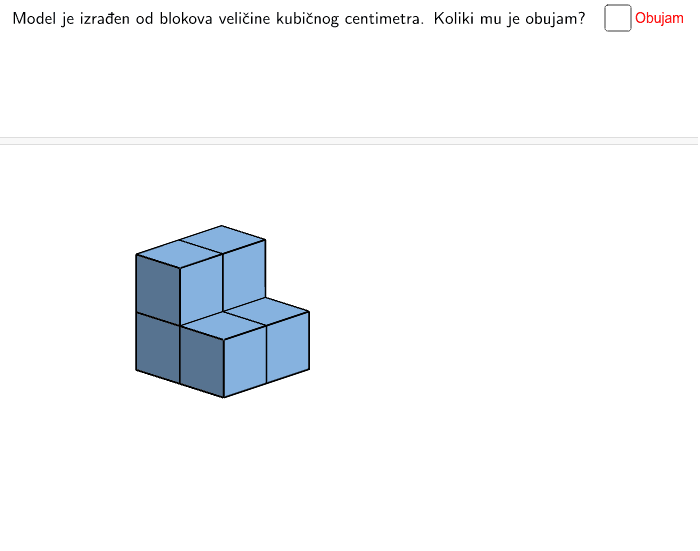
This example demonstrates volume calculation through cube concatenation, involving solid geometry and spatial coordinates. Construction uses Point, Cube, Translate commands to create cube objects, and visualizes faces and edges. Suitable for middle school students learning volume concepts and spatial visualization.
GeoGebra Commands & Parameters
Point(Circle[B, Distance[A, B], Segment[A, B]]) → CPoint(Circle[J, Distance[I, J], Segment[I, J]]) → KPoint(Circle[R, Distance[Q, R], Segment[Q, R]]) → SPoint(Circle[H_1, Distance[G_1, H_1], Segment[G_1, H_1]]) → I_1Cube(G_1, H_1, I_1) → e_1, J_1, face11, facez, edge13, edge12, edge15, edge17, edge14, edge19, edge21, edge20, K_1, edge16, edge22, edge18, edge23, L_1, M_1, N_1, face7, face9, facey, facexTranslate(Cube[(0, 0), (1, 0), Point[Circle[(1, 0), Distance[(0, 0), (1, 0)], Segment[(0, 0), (1, 0)]]]], Vector[(0, 0), (2, 1)]) → fTranslate(Cube[(0, 0), (1, 0), Point[Circle[(1, 0), Distance[(0, 0), (1, 0)], Segment[(0, 0), (1, 0)]]]], Vector[(0, 0), (1, 0)]) → gTranslate(Cube[(0, 0), (1, 0), Point[Circle[(1, 0), Distance[(0, 0), (1, 0)], Segment[(0, 0), (1, 0)]]]], Vector[(0, 0), (1, 1, 1)]) → hTranslate(Cube[(0, 0), (1, 0), Point[Circle[(1, 0), Distance[(0, 0), (1, 0)], Segment[(0, 0), (1, 0)]]]], Vector[(0, 0), (1, 1)]) → eTranslate(Cube[(0, 0), (1, 0), Point[Circle[(1, 0), Distance[(0, 0), (1, 0)], Segment[(0, 0), (1, 0)]]]], Vector[(0, 0), (1, 1)]) → e'Translate(facex, Vector[(0, 0, 0), (0, -1, 0)]) → facex010Translate(facey, Vector[(0, 0), (1, 0, 0)]) → facey100Translate(Cube[(0, 0), (1, 0), Point[Circle[(1, 0), Distance[(0, 0), (1, 0)], Segment[(0, 0), (1, 0)]]]], Vector[(0, 0), (2, 1)]) → f'Translate(Cube[(0, 0), (1, 0), Point[Circle[(1, 0), Distance[(0, 0), (1, 0)], Segment[(0, 0), (1, 0)]]]], Vector[(2, 0)]) → aTranslate(Cube[(0, 0), (1, 0), Point[Circle[(1, 0), Distance[(0, 0), (1, 0)], Segment[(0, 0), (1, 0)]]]], Vector[(2, 0)]) → a'Translate(facez, Vector[(0, 0, 0), (0, -1, 0)]) → facez010Translate(facey, Vector[(0, 0, 1)]) → facey001Translate(Cube[(0, 0), (1, 0), Point[Circle[(1, 0), Distance[(0, 0), (1, 0)], Segment[(0, 0), (1, 0)]]]], Vector[(1, 0, 1)]) → bTranslate(Cube[(0, 0), (1, 0), Point[Circle[(1, 0), Distance[(0, 0), (1, 0)], Segment[(0, 0), (1, 0)]]]], Vector[(1, 0, 1)]) → b'Translate(Cube[(0, 0), (1, 0), Point[Circle[(1, 0), Distance[(0, 0), (1, 0)], Segment[(0, 0), (1, 0)]]]], Vector[(0, 0), (1, 0)]) → g'Translate(Cube[(0, 0), (1, 0), Point[Circle[(1, 0), Distance[(0, 0), (1, 0)], Segment[(0, 0), (1, 0)]]]], Vector[(0, 0), (1, 1, 1)]) → h'Translate(Prism[Polygon[(-4, 2), (-2, 2), (-2, 2, 1), (-3, 2, 1), (-3, 2, 2), (-4, 2, 2)], (-4, 0, 0)], Vector[(0, 0)]) → cTranslate(Prism[Polygon[(-4, 2), (-2, 2), (-2, 2, 1), (-3, 2, 1), (-3, 2, 2), (-4, 2, 2)], (-4, 0, 0)], Vector[(0, 0)]) → dTranslate(Polygon[(-4, 1), (-2, 1), (-2, 1, 1), (-3, 1, 1), (-3, 1, 2), (-4, 1, 2)], Vector[(0, 0)]) → poly1Translate(Polygon[(-4, 0, 1), (-3, 0, 1), (-3, 2, 1), (-4, 2, 1)], Vector[(0, 0)]) → poly2Translate(Polygon[(-3, 0, 0), (-3, 2, 0), (-3, 2, 1), (-3, 0, 1)], Vector[(0, 0)]) → poly3
AI Drawing Prompt Reference
Create a visual example demonstrating volume calculation through cube concatenation. Start by plotting several points, then construct cubes based on these points. Use translation commands to move the cubes to different positions, forming a combination of cubes. Highlight the faces and edges of the cubes to clearly illustrate the volume calculation process, suitable for educational purposes.
The prompt above was compiled from the original drawing commands and is for reference only.