
Volume Calculation of Composite Solids
Loading the math board and drawing, please wait…
In collections
Ⓔ Volumen zusammengesetzter Körper aus Quader und Würfel
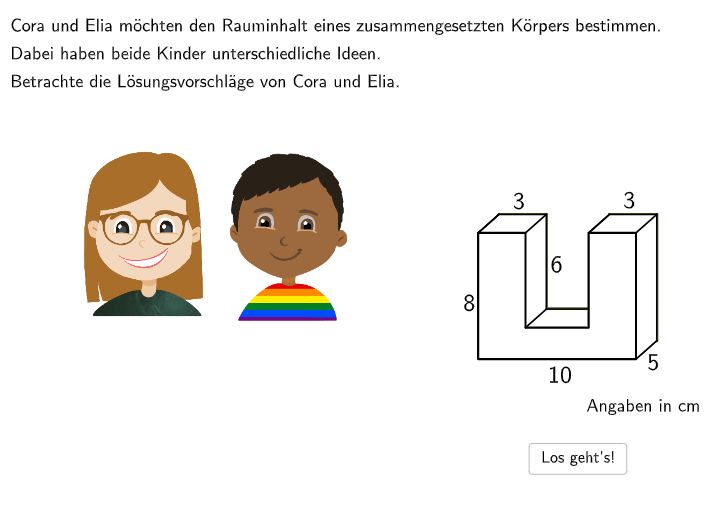
This example demonstrates using GeoGebra to decompose composite geometric solids and calculate their volumes. Key mathematical concepts include volume formulas for solids, decomposition into unit cubes, and volume calculation of rectangular prisms. Construction involves GeoGebra commands like Textfield, Sum, Segment, and parameter input. Suitable for middle and high school students for geometry learning and practical application.
GeoGebra Commands & Parameters
Textfield(input1) → InputBox1Textfield(input2) → InputBox2Sum({attemptCountInputBox1, attemptCountInputBox2, attemptCountInputBox3, attemptCountInputBox4, attemptCountInputBox5}) → attemptCountShuffle(Sequence[Random[0, 10], i, 1, 100]) → randomNosForX, {7, 3, 10, 7, 4, 4, 6, 8, 5, 5, 2, 3, 3, 3, 4, 4, 9, 1, 0, 8, 6, 4, 8, 6, 7, 0, 7, 9, 1, 5, 8, 8, 3, 4, 7, 2, 0, 9, 4, 1, 9, 0, 10, 0, 6, 3, 6, 0, 0, 8, 10, 0, 4, 8, 5, 9, 6, 10, 2, 0, 3, 1, 1, 0, 2, 2, 4, 9, 5, 0, 7, 2, 3, 1, 7, 4, 0, 2, 2, 3, 2, 5, 9, 6, 5, 8, 6, 9, 0, 1, 10, 0, 5, 10, 4, 6, 5, 5, 10, 8}Element(randomNosForX, Mod[questionCount, 100] + 1) → numXU(A, pointVec) → l1, l2, C, D, E, F, G, H, l0BG1, l4Kontur, l2Mantel, l4lines, l4linesManual, l5FG1, l5FG2, BLaTeX(step, true, true) → Text1Segment(pointOption1, F) → segmentOption1Segment(F, pointOption2) → segmentOption2Segment(E, pointOption3) → segmentOption3Segment(E, pointOption4) → segmentOption4Translate(C, pointVec) → C'Translate(pointOption4, pointVec) → pointOption4'Translate(F, pointVec) → F'Translate(G, pointVec) → G'Translate(H, pointVec) → H'If(option1, A, pointOption1) → pointObject11If(option1, pointOption2, F) → pointObject12Translate(D, pointVec) → D'Segment(pointOption4, pointOption4') → segmentOption41Translate(B, pointVec) → B'If(¬option4, pointOption4', B') → pointObject31If(¬option4, pointOption4, B) → pointObject32If(¬option4, E, pointOption3) → pointObject33If(option2 ∧ option4, 1, option1 ∧ option4, 2, option1 ∧ option3, 3, 4) → typSegment(G', D') → segmentFilled1Segment(G, D) → segmentFilled2Segment(pointOption1, F) → segmentCutted1Segment(E, pointOption4) → segmentCutted2Segment(pointOption4, pointOption4') → segmentCutted3Segment(B', C') → fSegment(C', D') → gSegment(D', D) → hSegment(E', F') → iSegment(F', G') → jSegment(G', H') → kSegment(H', H) → lIf(step ∈ {4, 5}, (-23.75, 32.5), (-23.75, 35)) → speechbubble12If(step ∈ {4, 5}, (0, 32.5), (3.75, 35)) → speechbubble13If(step ∈ {4, 5}, (0, 40.3), (3.75, 39.5)) → speechbubble14If(step ∈ {4, 5}, (-23.75, 40.3), (-23.75, 39.5)) → speechbubble15Textfield(input3) → InputBox3Textfield(input4) → InputBox4Textfield(input71) → InputBox71Textfield(input72) → InputBox72Textfield(input73) → InputBox73Textfield(input74) → InputBox74Textfield(input75) → InputBox75If((¬option1) ∧ (¬option2), input72 ≟ ((3 * 5) * 2), true) → correct72If((¬option3) ∧ (¬option4), input74 ≟ ((3 * 5) * 2), true) → correct74Dilate(Translate[l5FG2, (-10, 0)], step6Scalefactor, CenterOfDilation) → l3Dilate(Translate[listObject1, translationVector], step6Scalefactor, CenterOfDilation) → listObject1'Dilate(Translate[listObjectFilledLeftBottom, translationVector], step6Scalefactor, CenterOfDilation) → listObjectFilledLeftBottom'Dilate(Translate[listObjectFilledRightBottom, translationVector], step6Scalefactor, CenterOfDilation) → listObjectFilledRightBottom'Dilate(Segment[Translate[F, translationVector], Translate[pointOption2, translationVector]], step6Scalefactor, CenterOfDilation) → segmentOption2'Dilate(Segment[Translate[E, translationVector], Translate[pointOption3, translationVector]], step6Scalefactor, CenterOfDilation) → segmentOption3'Dilate(Segment[Translate[pointOption1, translationVector], Translate[F, translationVector]], step6Scalefactor, CenterOfDilation) → segmentOption1'Dilate(Translate[listObject3, translationVector], step6Scalefactor, CenterOfDilation) → listObject3'Dilate(Translate[listObject2, translationVector], step6Scalefactor, CenterOfDilation) → listObject2'Dilate(Translate[l0BG1, translationVector], step6Scalefactor, CenterOfDilation) → step6l0BG1'Dilate(Translate[l2Mantel, translationVector], step6Scalefactor, CenterOfDilation) → step6l2Mantel'Dilate(Translate[l4Kontur, translationVector], step6Scalefactor, CenterOfDilation) → step6l4Kontur'Dilate(Translate[l4linesManual, translationVector], step6Scalefactor, CenterOfDilation) → step6l4linesManual'Dilate(Translate[l5FG1, translationVector], step6Scalefactor, CenterOfDilation) → step6l5FG1'Dilate(Translate[l5FG2, translationVector], step6Scalefactor, CenterOfDilation) → step6l5FG2'Dilate(Segment[Translate[pointOption4, translationVector], Translate[pointOption4', translationVector]], step6Scalefactor, CenterOfDilation) → segmentOption41'Dilate(Translate[listObjectFilledRightBottom, translationVector], step6Scalefactor, CenterOfDilation) → listObjectFilledRightBottomBG'PolyLine(Dilate[B, step6Scalefactor, CenterOfDilation], Dilate[B', step6Scalefactor, CenterOfDilation], Dilate[A, step6Scalefactor, CenterOfDilation], Dilate[C', step6Scalefactor, CenterOfDilation], Dilate[D', step6Scalefactor, CenterOfDilation], Dilate[D, step6Scalefactor, CenterOfDilation], Dilate[E', step6Scalefactor, CenterOfDilation], Dilate[F', step6Scalefactor, CenterOfDilation], Dilate[G', step6Scalefactor, CenterOfDilation], Dilate[H', step6Scalefactor, CenterOfDilation], Dilate[H, step6Scalefactor, CenterOfDilation]) → mPolyLine(Translate[E, translationVector], Translate[pointOption4, translationVector], Translate[I', translationVector]) → nDilate(PolyLine[Translate[E, translationVector], Translate[pointOption4, translationVector], Translate[I', translationVector]], step6Scalefactor, CenterOfDilation) → segmentOption4'Translate(cora, (7, 0)) → cora'Textfield(input31) → InputBox31Textfield(input32) → InputBox32Translate(elia, (30.434007263501044, -17.511741828561323)) → elia'Translate(Mirror[speechbubble2, x = -18], (0.5, -20)) → speechbubble3Textfield(input2a) → InputBox2aTextfield(input3a) → InputBox3aTextfield(input1a) → InputBox1aTextfield(input1b) → InputBox1b
AI Drawing Prompt Reference
In a 3D coordinate view, draw a composite solid made from two matching rectangular prisms, arranged so it can be decomposed for a volume calculation. Include on-screen step text and input-box style parameter prompts to guide the process. Construct a base set of points and a central edge, then generate the top/bottom and left/right parts by translating the corresponding points. Connect the boundary using several line segments to form the outer contour (before cutting), and use translated corresponding edges to create the cut/inner boundary lines. Keep both the cut-edged segments and the filled contour edges visible, together with the explanatory step text for the calculation.
The prompt above was compiled from the original drawing commands and is for reference only.