
Volume and Surface Area of a Cuboid - Interactive Exploration
Loading the math board and drawing, please wait…
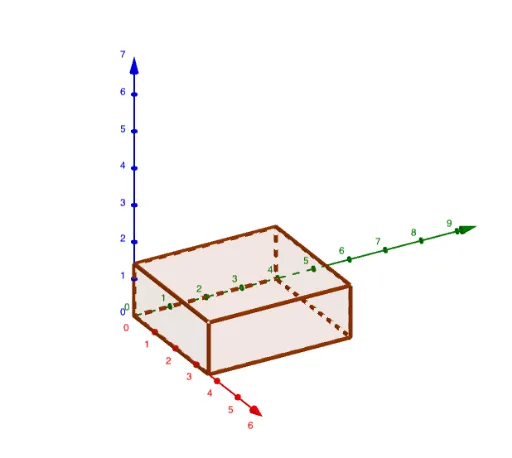
This GeoGebra example demonstrates the calculation of volume and surface area for a cuboid (rectangular prism) through an interactive interface. The core mathematical concepts involve the volume formula (length × width × height) and surface area formula (2×(length×width + length×height + width×height)) in solid geometry. The construction uses Polygon commands to draw the cuboid's faces, Textfield and LaTeX commands to create editable input boxes and formula displays, and defines variables (such as a, b, q1) linked to dimensions. Dynamic objects Volume and SurfaceArea update in real time as users adjust length, width, and height via sliders or input fields. This resource is suitable for middle school to high school students learning 3D measurement, and serves as an effective tool for classroom demonstrations or self-directed exploration of how changing dimensions affects volume and surface area.
GeoGebra Commands & Parameters
Polygon((0, 0, 0), (a, 0, 0), (a, b, 0), (0, b, 0)) → q1, f, g, h, iTextfield(Volume) → InputBox1Polygon((0, 0, Height), (a, 0, Height), (a, b, Height), (0, b, Height)) → q2, j, k, l, mPolygon((0, 0, 0), (a, 0, 0), (a, 0, Height), (0, 0, Height)) → q3, n, p, q, rPolygon((0, b, 0), (a, b, 0), (a, b, Height), (0, b, Height)) → q4, s, t, c, dPolygon((a, 0, 0), (a, b, 0), (a, b, Height), (a, 0, Height)) → q5, e, f_1, g_1, h_1Polygon((0, 0, 0), (0, b, 0), (0, b, Height), (0, 0, Height)) → q6, i_1, j_1, k_1, l_1LaTeX(SurfaceArea, true, true) → text1
AI Drawing Prompt Reference
Draw a 3D rectangular cuboid with adjustable length, width, and height controlled by sliders or input fields. Start by drawing the bottom face as a rectangle, then the top face parallel to it, and connect the four vertical edges to form the complete solid. Include two text boxes near the shape: one for entering or displaying the volume, and another showing the surface area formula with its computed value. As the dimensions change, both volume and surface area update dynamically. Use semi-transparent faces or wireframe style for clarity.
The prompt above was compiled from the original drawing commands and is for reference only.