
Visualizing Triangle Inequalities by kneido
Loading the math board and drawing, please wait…
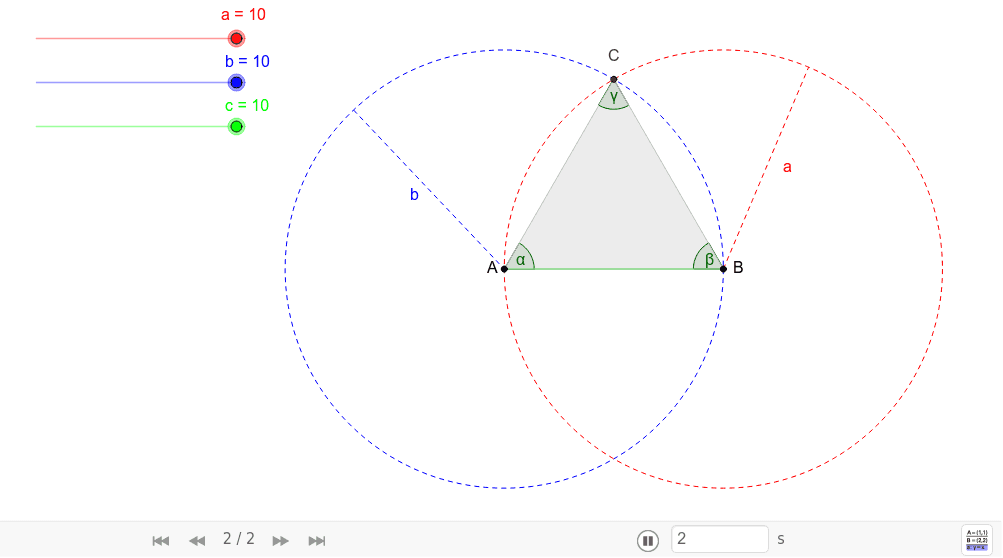
This dynamic worksheet illustrates the construction of a triangle with given side lengths a, b, and c. Students can adjust the side lengths to visually understand the triangle inequalities. Commands used include point, segment, circle, intersect, polygon, angle, and midpoint. Suitable for middle school and above students learning geometric construction.
GeoGebra Commands & Parameters
Point(Circle[A, abs(c)]) → BSegment(A, B) → dCircle(A, b) → ePoint(e) → DSegment(D, A) → gCircle(B, a) → fPoint(f) → FSegment(B, F) → hIntersect(e, f, 1) → CPolygon(A, B, C) → poly1, c_1, a_1, b_1Angle(poly1) → α, β, γMidpoint(g) → EMidpoint(h) → G
AI Drawing Prompt Reference
Draw a triangle with given side lengths a, b, and c. Start by drawing a circle centered at point A with radius c, and mark a point B on the circle. Then draw segment AB. Next, draw a circle centered at A with radius b, and mark a point D on the circle. Draw segment AD. Then draw a circle centered at B with radius a, and mark a point F on the circle. Draw segment BF. The intersection of segments AB and BF is point C, which is the third vertex of the triangle. Finally, draw triangle ABC and label the three interior angles.
The prompt above was compiled from the original drawing commands and is for reference only.