
Visualizing Multiplication of Natural Numbers by kneido
Loading the math board and drawing, please wait…
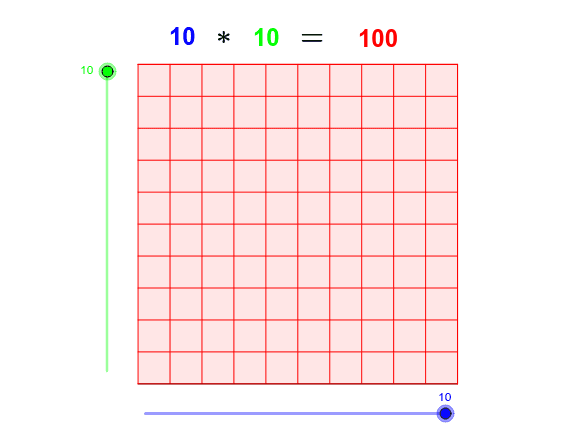
① This example demonstrates the multiplication of natural numbers through an interactive geometric grid, where the product is shown as a rectangular array of points or cells, making the concept of repeated addition visually tangible. ② Core mathematical concepts include natural number multiplication, area models, sequences, and continuity, with connections to limits, congruence, quadratic functions, and division, providing a foundation for later algebra. ③ Construction highlights: using GeoGebra commands such as Point, Segment, OrthogonalLine, Circle, Intersect, Line, Polygon, and Sequence, the applet builds rows and columns (Columns, Rows) with points A, B, C, D and auxiliary objects a, b, c, d, e, then uses lists list1, list2 and text objects text1-text5 to dynamically display the product and the corresponding equation. ④ This is ideal for upper elementary to middle school students, helping them understand multiplication visually, and also serves as a template for teachers to create interactive math demonstrations.
GeoGebra Commands & Parameters
Point(Circle[A, abs(Columns)]) → BSegment(A, B) → aOrthogonalLine(A, a) → bOrthogonalLine(B, a) → cCircle(A, Rows) → dIntersect(d, b, 2) → CLine(C, a) → eIntersect(c, e) → DPolygon(A, B, D, C) → poly1, a_1, b_1, d_1, c_1Sequence(Segment[A + (i * (1, 0)), C + (i * (1, 0))], i, 1, Columns) → list1Sequence(Segment[A + (i * (0, 1)), B + (i * (0, 1))], i, 1, Rows) → list2
AI Drawing Prompt Reference
Draw a multiplication grid using points A and B to represent rows and columns, construct auxiliary lines and circles to determine points C and D, then use these points to form a quadrilateral. Next, use sequence commands to draw multiple segments from A to C and from A to B, creating a grid structure to display the multiplication result.
The prompt above was compiled from the original drawing commands and is for reference only.