
Visualizing Square Numbers
Loading the math board and drawing, please wait…
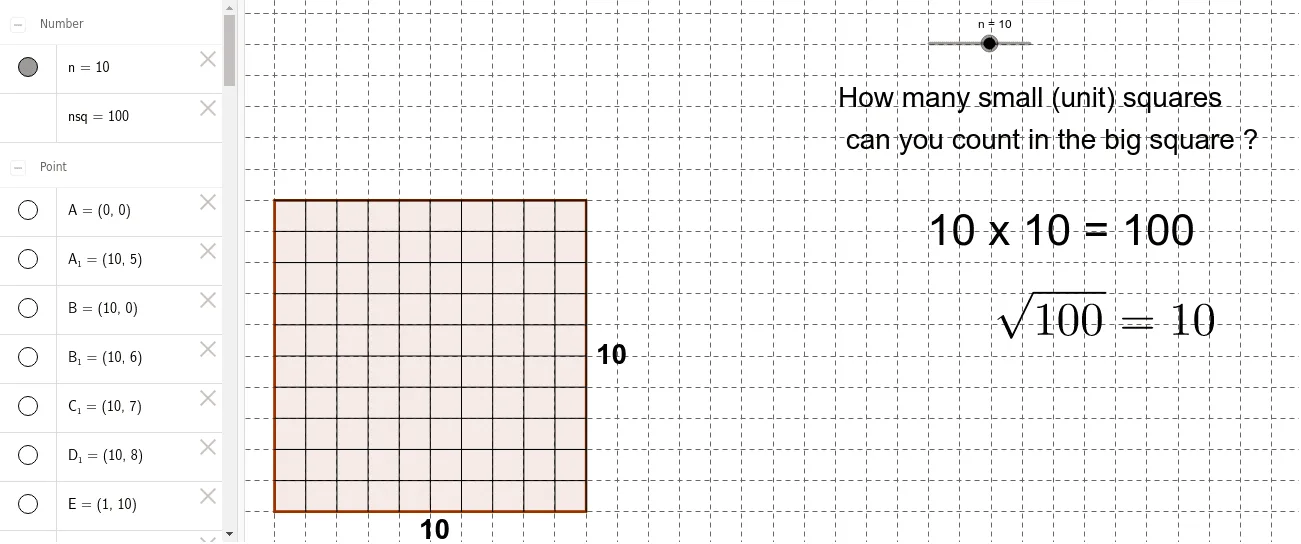
This example demonstrates the geometric representation and sequence generation of square numbers. It involves core mathematical concepts such as sequences, square operations, and geometric constructions. The construction uses GeoGebra commands/objects like Polygon, Point, and Segment. Suitable for middle school students and above to learn about sequences, function graphs, and geometric representations.
GeoGebra Commands & Parameters
Polygon(A, B, 4) → poly1, a, b, c, d, C, DPoint(Circle[A1, n]) → ESegment(A1, E) → ePoint(Circle[A2, n]) → FSegment(A2, F) → fPoint(Circle[A3, n]) → GSegment(A3, G) → gPoint(Circle[A4, n]) → HSegment(A4, H) → hPoint(Circle[A5, n]) → ISegment(A5, I) → iPoint(Circle[A6, n]) → JSegment(A6, J) → jPoint(Circle[A7, n]) → KSegment(A7, K) → kPoint(Circle[A8, n]) → LSegment(A8, L) → lPoint(Circle[A9, n]) → MSegment(A9, M) → mPoint(Circle[A10, n]) → NSegment(A10, N) → pPoint(Circle[A11, n]) → OSegment(A11, O) → qPoint(Circle[A12, n]) → PSegment(A12, P) → rPoint(Circle[A13, n]) → QSegment(A13, Q) → sPoint(Circle[A14, n]) → RSegment(A14, R) → tPoint(Circle[A15, n]) → SSegment(A15, S) → a_1Point(Circle[A16, n]) → TSegment(A16, T) → b_1Point(Circle[B1, n]) → USegment(B1, U) → c_1Point(Circle[B2, n]) → VSegment(B2, V) → d_1Point(Circle[B3, n]) → WSegment(B3, W) → e_1Point(Circle[B4, n]) → ZSegment(B4, Z) → f_1Point(Circle[B5, n]) → A_1Segment(B5, A_1) → g_1Point(Circle[B6, n]) → B_1Segment(B6, B_1) → h_1Point(Circle[B7, n]) → C_1Segment(B7, C_1) → i_1Point(Circle[B8, n]) → D_1Segment(B8, D_1) → j_1Point(Circle[B9, n]) → E_1Segment(B9, E_1) → k_1Point(Circle[B10, n]) → F_1Segment(B10, F_1) → l_1Point(Circle[B11, n]) → G_1Segment(B11, G_1) → m_1Point(Circle[B12, n]) → H_1Segment(B12, H_1) → n_1Point(Circle[B13, n]) → I_1Segment(B13, I_1) → p_1Point(Circle[B14, n]) → J_1Segment(B14, J_1) → q_1Point(Circle[B15, n]) → K_1Segment(B15, K_1) → r_1Point(Circle[B16, n]) → L_1Segment(B16, L_1) → s_1
AI Drawing Prompt Reference
Construct a geometric visualization starting with points A and B, using them to define an initial square (with its four vertices and the corresponding edges). Then, on successive positions along one reference side, mark points located on the same family of circles (take the first through eighth such circle points). For each chosen circle point, draw a segment from the matching side-start point to that point, producing a sequence of connected segments that extend from the square’s side to the circle points.
The prompt above was compiled from the original drawing commands and is for reference only.