
Visualizing Square Numbers by Eduardo Neto
Loading the math board and drawing, please wait…
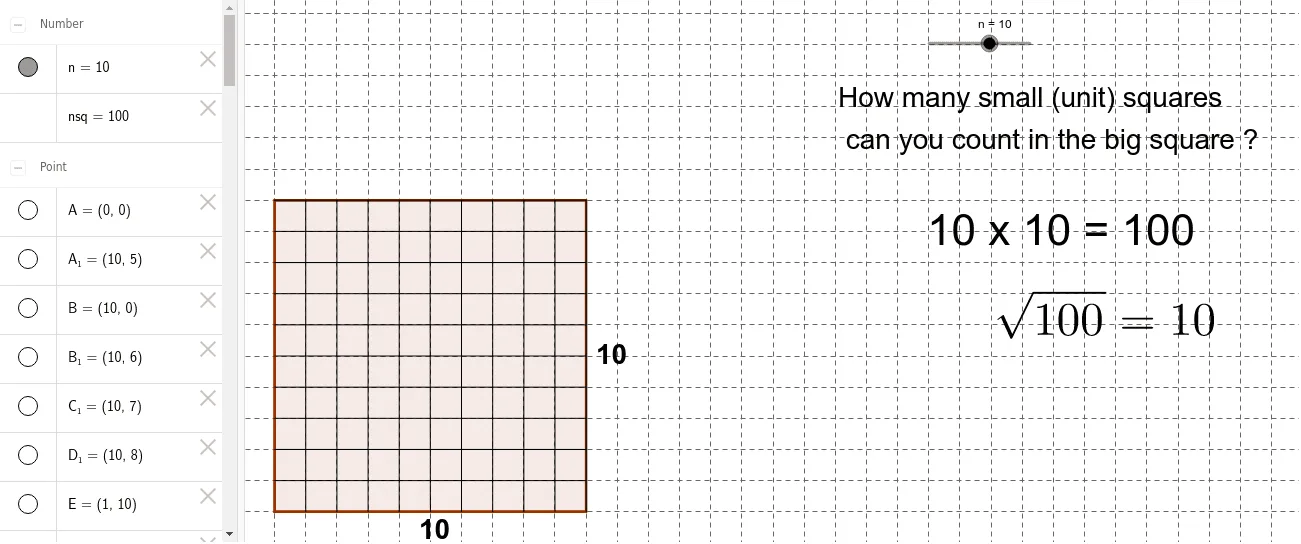
This example dynamically demonstrates the geometric representation of square numbers, showing how each natural number's square corresponds to a square's area. Key math concepts include square operations, geometric area, sequences, and function relationships. GeoGebra commands like Polygon, Point, and Segment are used, controlled by a slider n for square side length variation. Suitable for middle school and above, illustrating number-shape combination and square number patterns.
GeoGebra Commands & Parameters
Polygon(A, B, 4) → poly1, a, b, c, d, C, DPoint(Circle[A1, n]) → ESegment(A1, E) → ePoint(Circle[A2, n]) → FSegment(A2, F) → fPoint(Circle[A3, n]) → GSegment(A3, G) → gPoint(Circle[A4, n]) → HSegment(A4, H) → hPoint(Circle[A5, n]) → ISegment(A5, I) → iPoint(Circle[A6, n]) → JSegment(A6, J) → jPoint(Circle[A7, n]) → KSegment(A7, K) → kPoint(Circle[A8, n]) → LSegment(A8, L) → lPoint(Circle[A9, n]) → MSegment(A9, M) → mPoint(Circle[A10, n]) → NSegment(A10, N) → pPoint(Circle[A11, n]) → OSegment(A11, O) → qPoint(Circle[A12, n]) → PSegment(A12, P) → rPoint(Circle[A13, n]) → QSegment(A13, Q) → sPoint(Circle[A14, n]) → RSegment(A14, R) → tPoint(Circle[A15, n]) → SSegment(A15, S) → a_1Point(Circle[A16, n]) → TSegment(A16, T) → b_1Point(Circle[B1, n]) → USegment(B1, U) → c_1Point(Circle[B2, n]) → VSegment(B2, V) → d_1Point(Circle[B3, n]) → WSegment(B3, W) → e_1Point(Circle[B4, n]) → ZSegment(B4, Z) → f_1Point(Circle[B5, n]) → A_1Segment(B5, A_1) → g_1Point(Circle[B6, n]) → B_1Segment(B6, B_1) → h_1Point(Circle[B7, n]) → C_1Segment(B7, C_1) → i_1Point(Circle[B8, n]) → D_1Segment(B8, D_1) → j_1Point(Circle[B9, n]) → E_1Segment(B9, E_1) → k_1Point(Circle[B10, n]) → F_1Segment(B10, F_1) → l_1Point(Circle[B11, n]) → G_1Segment(B11, G_1) → m_1Point(Circle[B12, n]) → H_1Segment(B12, H_1) → n_1Point(Circle[B13, n]) → I_1Segment(B13, I_1) → p_1Point(Circle[B14, n]) → J_1Segment(B14, J_1) → q_1Point(Circle[B15, n]) → K_1Segment(B15, K_1) → r_1Point(Circle[B16, n]) → L_1Segment(B16, L_1) → s_1
AI Drawing Prompt Reference
Create a dynamic visualization of square numbers by adjusting the slider n to change the side length of a square, showing how each natural number's square corresponds to the area of a square. Start by drawing a square, then draw circles centered at each vertex with a radius equal to the slider value n, and the intersection of these circles with the square forms a series of line segments, illustrating the geometric representation of square numbers.
The prompt above was compiled from the original drawing commands and is for reference only.