
Visualizing Fractions with Multiple Models
Loading the math board and drawing, please wait…
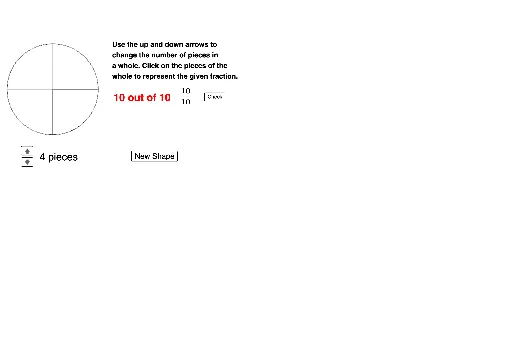
① This example demonstrates how to build and visualize fractions using various geometric models, such as circles and segments, making the concept of fractions tangible. ② Core math concepts include fraction meaning, equal partitioning, part-whole relationships, and connections to real numbers and continuity. ③ Construction highlights: uses GeoGebra commands like Circle, OrthogonalLine, Intersect, Sequence, Element, Segment, and Random; objects include up, down, radius, A, c, f, B, NumberOfParts, WedgeSize, WedgeDots, Wedges, and multiple Wedge01-20 elements, plus colorchanger objects for dynamic coloring. ④ Suitable for upper elementary to middle school students, ideal for interactive lessons on fraction basics, equal division, and fraction comparison, also useful for teacher demonstrations.
GeoGebra Commands & Parameters
Circle(A, radius) → cOrthogonalLine(A, xAxis) → fIntersect(c, f, 2) → BSequence(Rotate[B, (WedgeSize° * i), A], i, 0, NumberOfParts) → WedgeDotsSequence(CircleSector[A, Element[WedgeDots, i], Element[WedgeDots, i + 1]], i, 1, NumberOfParts) → WedgesElement(Wedges, 1) → Wedge01Element(Wedges, 2) → Wedge02Element(Wedges, 3) → Wedge03Element(Wedges, 4) → Wedge04Element(Wedges, 5) → Wedge05Element(Wedges, 6) → Wedge06Element(Wedges, 7) → Wedge07Element(Wedges, 8) → Wedge08Element(Wedges, 9) → Wedge09Element(Wedges, 10) → Wedge10Element(Wedges, 11) → Wedge11Element(Wedges, 12) → Wedge12Element(Wedges, 13) → Wedge13Element(Wedges, 14) → Wedge14Element(Wedges, 15) → Wedge15Element(Wedges, 16) → Wedge16Element(Wedges, 17) → Wedge17Element(Wedges, 18) → Wedge18Element(Wedges, 19) → Wedge19Element(Wedges, 20) → Wedge20Segment(C, D) → gSegment(D, E) → hSegment(E, F) → iSegment(F, C) → jSequence(C + ((StripWidth * i), 0), i, 0, NumberOfParts) → LowerDotsSequence(F + ((StripWidth * i), 0), i, 0, NumberOfParts) → UpperDotsSequence(Polygon[Element[LowerDots, i], Element[LowerDots, i + 1], Element[UpperDots, i + 1], Element[UpperDots, i]], i, 1, NumberOfParts) → VerticalStripsListElement(VerticalStripsList, 1) → Vertical01Element(VerticalStripsList, 2) → Vertical02Element(VerticalStripsList, 3) → Vertical03Element(VerticalStripsList, 4) → Vertical04Element(VerticalStripsList, 5) → Vertical05Element(VerticalStripsList, 6) → Vertical06Element(VerticalStripsList, 7) → Vertical07Element(VerticalStripsList, 8) → Vertical08Element(VerticalStripsList, 9) → Vertical09Element(VerticalStripsList, 10) → Vertical10Element(VerticalStripsList, 11) → Vertical11Element(VerticalStripsList, 12) → Vertical12Element(VerticalStripsList, 13) → Vertical13Element(VerticalStripsList, 14) → Vertical14Element(VerticalStripsList, 15) → Vertical15Element(VerticalStripsList, 16) → Vertical16Element(VerticalStripsList, 17) → Vertical17Element(VerticalStripsList, 18) → Vertical18Element(VerticalStripsList, 19) → Vertical19Element(VerticalStripsList, 20) → Vertical20Segment(G, H) → kSegment(H, I) → lSegment(I, J) → mSegment(J, G) → nSequence(G + (0, (StripWidth * i)), i, 0, NumberOfParts) → LeftDotsSequence(H + (0, (StripWidth * i)), i, 0, NumberOfParts) → RightDotsSequence(Polygon[Element[LeftDots, i], Element[RightDots, i], Element[RightDots, i + 1], Element[LeftDots, i + 1]], i, 1, NumberOfParts) → HorizontalStripsListElement(HorizontalStripsList, 1) → Horizontal01Element(HorizontalStripsList, 2) → Horizontal02Element(HorizontalStripsList, 3) → Horizontal03Element(HorizontalStripsList, 4) → Horizontal04Element(HorizontalStripsList, 5) → Horizontal05Element(HorizontalStripsList, 6) → Horizontal06Element(HorizontalStripsList, 7) → Horizontal07Element(HorizontalStripsList, 8) → Horizontal08Element(HorizontalStripsList, 9) → Horizontal09Element(HorizontalStripsList, 10) → Horizontal10Element(HorizontalStripsList, 11) → Horizontal11Element(HorizontalStripsList, 12) → Horizontal12Element(HorizontalStripsList, 13) → Horizontal13Element(HorizontalStripsList, 14) → Horizontal14Element(HorizontalStripsList, 15) → Horizontal15Element(HorizontalStripsList, 16) → Horizontal16Element(HorizontalStripsList, 17) → Horizontal17Element(HorizontalStripsList, 18) → Horizontal18Element(HorizontalStripsList, 19) → Horizontal19Element(HorizontalStripsList, 20) → Horizontal20Random(2, 20) → MakeThisDenominatorRandom(1, MakeThisDenominator) → MakeThisNumerator
AI Drawing Prompt Reference
Draw a circle and divide it into multiple sectors, each representing a fraction part. Then, draw a horizontal line through the center of the circle and extend several vertical strips from the center, dividing the circle into equal parts, with each strip corresponding to a sector. Finally, color each sector and strip differently to better illustrate the concept of fractions.
The prompt above was compiled from the original drawing commands and is for reference only.