
Visualizing Fraction Addition with Piecewise Geometry
Loading the math board and drawing, please wait…
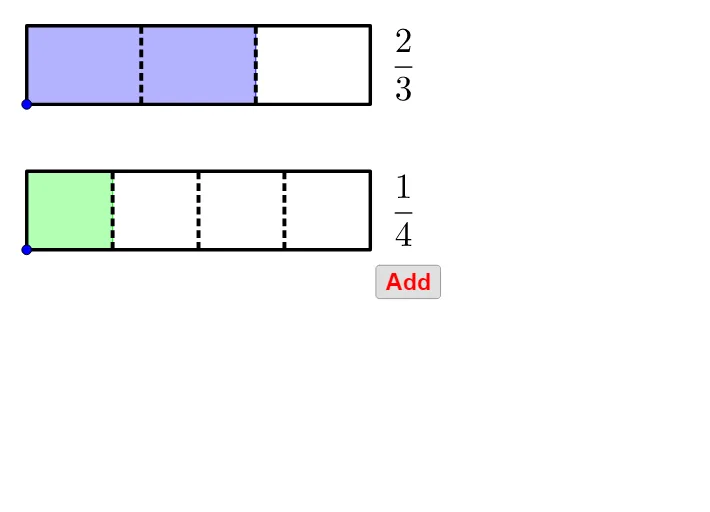
This example demonstrates how to perform and visualize fraction addition by constructing geometric/graph-based pieces for two input fractions and then combining them to reveal the final fraction result. It centers on the math of adding fractions (and the equivalent transformations needed to reach a simplified/combined form), using the idea of piecewise functions to reflect that different conditions correspond to different algebraic expressions. The GeoGebra construction (from the provided command summary) builds key points and connectors with Point, Segment, and Polygon; it controls conditional pieces using If and Ray; it manages dynamic sequences and labels with Sequence and Textfield; it renders fraction notation with FractionText (for the intermediate fractions and the final fractional expression); and it uses Vector plus additional text objects for annotations and positioning. Lists of objects and polygonal pieces (list1–list4, poly1–poly4, c1–c2) are used to assemble the final visual narrative. Suitable for middle/high school students and early university learners learning algebra, function graphs, and piecewise modeling.
GeoGebra Commands & Parameters
Point(yAxis) → CPoint(Segment[C + (0, h), C + (0, (1.85 * h))]) → BIf(t ≤ 0.5, 0, (2 * (t - 0.5))) → t2If(t ≤ 0.5, (2 * t), 1) → t1Point(Segment[B + (0, h), B + (0, (1.85 * h))]) → ARay((0, 1.9), (0, 2.9)) → fPolygon({A, A + (l, 0), A + (l, h), A + (0, h)}) → poly1Polygon({B, B + (l, 0), B + (l, h), B + (0, h)}) → poly2Sequence(Segment[A + ((i * l / a1), 0), A + ((i * l / a1), h)], i, 1, a1 - 1) → list1Sequence(Segment[B + ((i * l / a2), 0), B + ((i * l / a2), h)], i, 1, a2 - 1) → list2Polygon({A, A + ((b1 * l / a1), 0), A + ((b1 * l / a1), h), A + (0, h)}) → poly3Polygon({B, B + ((b2 * l / a2), 0), B + ((b2 * l / a2), h), B + (0, h)}) → poly4Sequence(Sequence[Segment[A + ((i * l / a1) + (j * l / ((a1 * c1))), 0), A + ((i * l / a1) + (j * l / ((a1 * c1))), h)], j, 1, c1 - 1], i, 0, a1 - 1) → list3Sequence(Sequence[Segment[B + ((i * l / a2) + (j * l / ((a2 * c2))), 0), B + ((i * l / a2) + (j * l / ((a2 * c2))), h)], j, 1, c2 - 1], i, 0, a2 - 1) → list4If(a1 ≟ a2, true, false) → equaldIf(equald ∧ (Div[b1 + b2, a1] > 0 ∨ GCD[b1 + b2, a1] > 1), true, If[Div[(b1 * c1) + (b2 * c2), (a1 * c1)] > 0 ∨ GCD[(b1 * c1) + (b2 * c2), (a1 * c1)] > 1, true, false]) → simplifyTextfield(a1) → InputBox1Textfield(b1) → InputBox2Textfield(a2) → InputBox3Textfield(b2) → InputBox4Polygon({A', A' + (l, 0), A' + (l, h), A' + (0, h)}) → poly5Polygon({B', B' + ((b2 / a2 * l), 0), B' + ((b2 / a2 * l), h), B' + (0, h)}) → poly6Polygon({A', A' + ((b1 * l / a1), 0), A' + ((b1 * l / a1), h), A' + (0, h)}) → poly7Polygon({B', B' + ((b2 * l / a2), 0), B' + ((b2 * l / a2), h), B' + (0, h)}) → poly8Sequence(Sequence[Segment[A' + ((i * l / a1) + (j * l / ((a1 * c1))), 0), A' + ((i * l / a1) + (j * l / ((a1 * c1))), h)], j, 1, c1 - 1], i, 0, b1 - 1) → list8Sequence(Sequence[Segment[B' + ((i * l / a2) + (j * l / ((a2 * c2))), 0), B' + ((i * l / a2) + (j * l / ((a2 * c2))), h)], j, 1, c2 - 1], i, 0, b2 - 1) → list9Segment(C - (0, 0.5), C - (0, 1)) → gSegment(C + ((b1 / a1 * l), -0.5), C + ((b1 / a1 * l), -1)) → iSegment(C + ((b1 / a1 * l) + (b2 / a2 * l), -0.5), C + ((b1 / a1 * l) + (b2 / a2 * l), -1)) → jVector(Midpoint[g], Midpoint[i]) → uVector(Midpoint[i], Midpoint[g]) → vVector(Midpoint[i], Midpoint[j]) → wVector(Midpoint[j], Midpoint[i]) → aSequence(Segment[A' + ((i * l / a1), 0), A' + ((i * l / a1), h)], i, 0, b1) → list6Sequence(Segment[B' + ((i * l / a2), 0), B' + ((i * l / a2), h)], i, 0, b2) → list7Sequence(Polygon[{C + ((i * l), 0), C + ((i * l) + l, 0), C + ((i * l) + l, h), C + ((i * l), h)}], i, 1, floor(b1 / a1 + b2 / a2)) → list5Segment(B', B' + ((b2 / a2 * l), 0)) → kSegment(B' + ((b2 / a2 * l), h), B' + (0, h)) → mIf(b1 / a1 + b2 / a2 ≥ 1, true, false) → improperFractionText(b1 / a1 + b2 / a2) → text19FractionText(b1 / a1 + b2 / a2 - 1) → text20Sequence(Sequence[Segment[C + ((i * l / ((a1 * c1))) + (j * l), 0), C + ((i * l / ((a1 * c1))) + (j * l), h)], i, 1, (a1 * c1) - 1], j, 0, If[b1 / a1 + b2 / a2 ≤ 1, 0, 1]) → list10
AI Drawing Prompt Reference
Create a geometric illustration to demonstrate fraction addition. Begin by drawing two rectangles on a horizontal line, one for each fraction's numerator and denominator. Divide each rectangle into smaller parts with colored line segments to represent individual fraction components. Then, combine the two rectangles by connecting corresponding parts with dashed lines, showing the calculation process of fraction addition. Finally, use a larger rectangle to represent the final result, and label the value of each part and the total fraction sum.
The prompt above was compiled from the original drawing commands and is for reference only.