
Verify Equation Solutions
Loading the math board and drawing, please wait…
In collections
Wiederholung: Variablen, Terme und Gleichungen
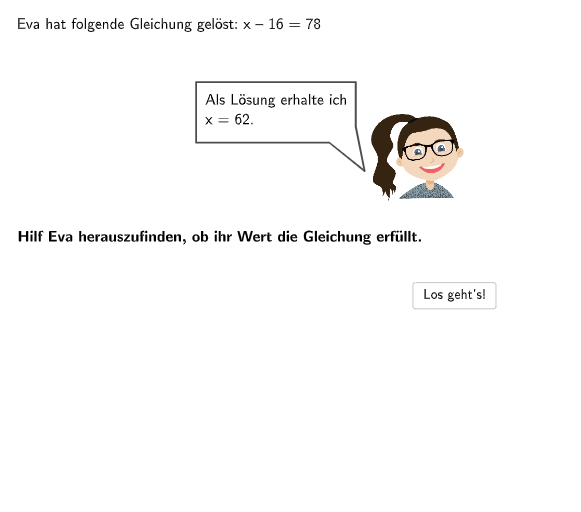
This example demonstrates the process of verifying solutions to equations. Key mathematical concepts include solving one-variable linear equations and algebraic operations. It utilizes GeoGebra's text input, conditional logic, and button interactions. Suitable for 5-6th grade students to practice solving equations and self-checking.
GeoGebra Commands & Parameters
Textfield(bInput) → InputBox2Textfield(aInput) → InputBox1Polygon(PtopLeftCornerFeedback, PtopRightCornerFeedback, PbottomRightCornerFeedback, PbottomLeftCornerFeedback) → rectangleCorrect, ptopleftcornerfeedback, ptoprightcornerfeedback, pbottomrightcornerfeedback, pbottomleftcornerfeedbackShuffle(Sequence[Random[21, 40], i, 1, 100]) → randomNosForX, {32, 21, 25, 27, 39, 35, 36, 38, 33, 32, 23, 40, 31, 37, 32, 25, 23, 29, 23, 21, 35, 22, 32, 23, 40, 38, 29, 24, 33, 33, 35, 38, 27, 34, 35, 26, 24, 24, 21, 26, 35, 29, 24, 29, 25, 37, 27, 28, 22, 33, 30, 30, 34, 31, 25, 32, 36, 32, 30, 30, 28, 37, 28, 31, 39, 38, 22, 34, 35, 24, 26, 25, 24, 28, 22, 24, 23, 32, 23, 26, 40, 38, 33, 33, 36, 33, 25, 24, 30, 33, 23, 28, 25, 39, 33, 26, 37, 26, 29, 38}Element(randomNosForX, Mod[questionCount, 100] + 1) → numXShuffle(Sequence[Random[1, 20], i, 1, 100]) → randomNosForY, {4, 13, 7, 3, 17, 11, 1, 11, 8, 19, 6, 5, 14, 5, 3, 12, 10, 1, 16, 7, 18, 4, 19, 10, 7, 3, 18, 20, 3, 15, 4, 5, 12, 16, 4, 12, 11, 4, 14, 7, 14, 4, 9, 2, 11, 6, 7, 7, 9, 11, 15, 15, 7, 8, 9, 14, 11, 13, 10, 5, 6, 8, 4, 2, 11, 16, 13, 4, 10, 1, 7, 14, 20, 11, 3, 2, 12, 14, 5, 12, 12, 19, 7, 18, 15, 9, 14, 13, 14, 4, 8, 11, 6, 17, 5, 17, 8, 5, 2, 4}Element(randomNosForY, Mod[questionCount, 100] + 1) → numYAppend(true, Sequence[If[randomNosForX(i) ≟ randomNosForX(i - 1), false, true], i, 2, 100]) → stayXAppend(true, Sequence[If[randomNosForY(i) ≟ randomNosForY(i - 1), false, true], i, 2, 100]) → stayYRemove(Sequence[If[stayX(i), randomNosForX(i), 0], i, 1, 100], Sequence[0, i, 1, 100]) → randomNosForXwithoutRepeatRemove(Sequence[If[stayY(i), randomNosForY(i), 0], i, 1, 100], Sequence[0, i, 1, 100]) → randomNosForYwithoutRepeatElement(randomNosForXwithoutRepeat, Mod[questionCount, Length[randomNosForXwithoutRepeat]] + 1) → numXwithoutRepeatElement(randomNosForYwithoutRepeat, Mod[questionCount, Length[randomNosForYwithoutRepeat]] + 1) → numYwithoutRepeatSpeechBubbleRight((3, 6), 3, 1) → Vieleck1Split(Text7, {"="}) → splittedTextPolygon(G, H, I, J, K, L, M) → Vieleck2, g, h, i, j, k, l, mSpeechBubbleLeft(V, 9.2, 2.5) → Vieleck3
AI Drawing Prompt Reference
Draw a graph containing a square and a polygon. The square's four vertices are located at points with x-coordinates 21, 32, 35, and 40. The polygon's vertices are located at points with x-coordinates 21, 32, 35, and 40, and y-coordinates 4, 13, 7, and 3. Ask the user to input two numbers representing x and y coordinates, and adjust the square and polygon's vertices based on the user's input.
The prompt above was compiled from the original drawing commands and is for reference only.