
Vectors in GeoGebra Guide: Rotation, Length, and Angle
Loading the math board and drawing, please wait…
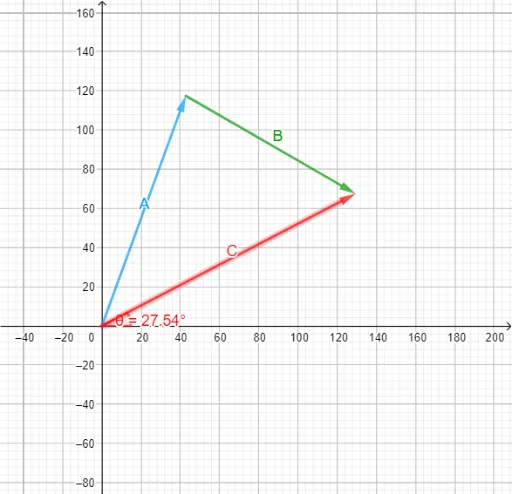
This example demonstrates how to create vectors in GeoGebra and perform basic operations such as rotation, measuring length, and calculating angles, providing a clear visual representation of vector geometry. Core mathematical concepts include vector definition, vector magnitude (length), vector rotation, and the angle between vectors. Construction highlights: the Vector command creates vectors, Rotate applies rotation, Length and Angle measure magnitude and angle respectively; objects include multiple text labels (text1 to text7) for points A, B, C and their rotated images A', B', as well as vector a and angle θ. Suitable for high school or early college students learning vector geometry, analytic geometry, or introductory linear algebra, and also useful for teachers preparing vector-based instructional materials.
GeoGebra Commands & Parameters
Vector((0, 0), (125, 0)) → A'Rotate(A', 70°) → AVector((x(A), y(A)), (x(A) + 100, y(A))) → B'Rotate(B', (-(30°))) → BVector((0, 0), (x(A) + x(B), y(A) + y(B))) → CLength(C) → aAngle(C) → θ
AI Drawing Prompt Reference
Draw a vector C which is the sum of vectors A and B. First, draw a horizontal vector A' from the origin with a length of 125. Then rotate A' counterclockwise by 70 degrees to get vector A. Next, draw vector B' from the endpoint of A with a length of 100 in the same direction as A. Rotate B' counterclockwise by 30 degrees to get vector B. Finally, draw vector C from the origin, which is the sum of the endpoints of A and B. Measure the length a of vector C and the angle θ it makes with the x-axis.
The prompt above was compiled from the original drawing commands and is for reference only.