
Vector Translation Demo
Loading the math board and drawing, please wait…
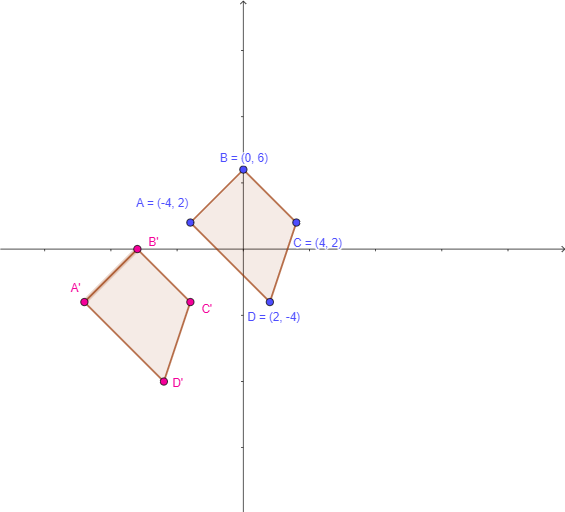
This example demonstrates how to perform geometric translations in the Cartesian plane using vectors. Key math concepts include vector representation, translation transformations, and coordinate calculations. Construction highlights the use of GeoGebra commands like Random, Vector, Polygon, Translate, and Textfield, along with objects such as buttons and polygons, to visualize pre-image and image relationships. Ideal for high school coordinate geometry instruction, aiding students in grasping the connection between vectors and geometric transformations.
GeoGebra Commands & Parameters
Random(-10, 10) → a, -8Random(-10, 10) → b, -6Vector((0, 0), (a, b)) → uPolygon(A, B, C, D) → q1, a_1, b_1, c, dTranslate(A, u) → A'Translate(B, u) → B'Translate(C, u) → C'Translate(D, u) → D'Polygon(A', B', C', D') → q1', a', b', c', d'Textfield(xA) → InputBox1Textfield(yA) → InputBox2Textfield(xB) → InputBox3Textfield(yB) → InputBox4Textfield(xC) → InputBox5Textfield(yC) → InputBox6Textfield(xD) → InputBox7Textfield(yD) → InputBox8
AI Drawing Prompt Reference
Draw a quadrilateral ABCD, then translate it to a new position using vector u=(-8, -6) to form a new quadrilateral A'B'C'D'. First, generate vector u with its starting point at the origin and ending point at (-8, -6). Then, draw quadrilateral ABCD, and translate points A, B, C, and D along vector u to get A', B', C', and D'. Finally, input the coordinates of each point in the input boxes to observe the changes in position before and after the translation.
The prompt above was compiled from the original drawing commands and is for reference only.