
Vector Subtraction: Dynamic Demonstration of Parallelogram and Triangle Rules
Loading the math board and drawing, please wait…
In collections
Vector Basics
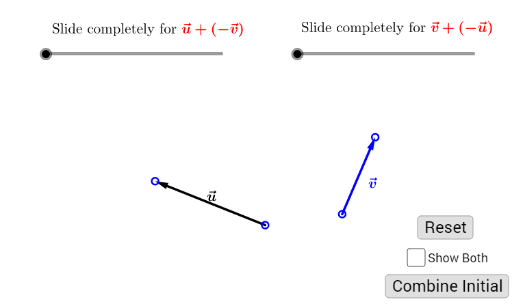
① This GeoGebra example dynamically demonstrates the subtraction of two vectors u and v (u−v and v−u), visually illustrating the geometric meaning of vector subtraction. ② The core mathematical concept is vector subtraction, which is equivalent to adding the opposite vector, and can be constructed using the parallelogram rule or the triangle rule. ③ Construction highlights: The Vector command creates vectors u and v, Point defines start points A and B, Translate is used to build the parallelogram, Rotate assists auxiliary construction, and If controls conditional display; objects include A, B, u', D, C, v', b, t_1, E, TransUV, C', D', a, t_2, F, TransVU, A', B', v, u, button1, text1, text1_1, D'', e, I, f, J, UV, v'', B'', c, G, u'', g, K, VU, button2, Show, ShowBoth_1, with buttons and text to toggle between the two subtraction results. ④ Suitable for high school plane vector lessons or introductory linear algebra, helping students understand the direction and magnitude of vector subtraction and its geometric construction.
GeoGebra Commands & Parameters
Vector(A, B) → u'Vector(C, D) → v'Segment(B, C) → bPoint(b, 1 - t_1) → EVector(C, E) → TransUVTranslate(C, TransUV) → C'Translate(D, TransUV) → D'Segment(A, D) → aPoint(a, t_2) → FVector(A, F) → TransVUTranslate(A, TransVU) → A'Translate(B, TransVU) → B'Vector(C', D') → vVector(F, B') → uRotate(D', 180°, E) → D''Segment(D'', E) → ePoint(e, 2 - t_1) → ISegment(D'', A) → fPoint(f, 3 - t_1) → JVector(A, J) → UVVector(E, I) → v''Rotate(B', 180°, D) → B''Segment(D, B'') → cPoint(c, t_2 - 1) → GVector(D, G) → u''Segment(C, B'') → gPoint(g, t_2 - 2) → KVector(C, K) → VUIf(Show ≟ true, t_1, 0) → ShowBoth_1If(Show ≟ true, t_2, 0) → ShowBoth_2
AI Drawing Prompt Reference
Draw two dynamic vectors u and v, demonstrating their subtraction u-v and v-u, visually illustrating the geometric meaning of vector subtraction through the parallelogram and triangle rules. Start by plotting the initial points of vectors u and v, then construct u-v using the parallelogram rule and v-u using the triangle rule. Include a slider to control the display and buttons to toggle between the two subtraction results.
The prompt above was compiled from the original drawing commands and is for reference only.