
Vector Properties Demo
Loading the math board and drawing, please wait…
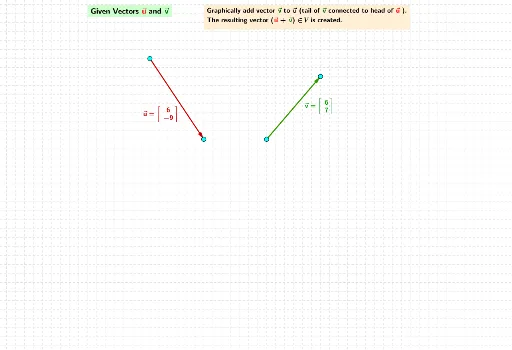
This example dynamically demonstrates vector properties including addition, scalar multiplication, and magnitude. It involves core math concepts like vector operations, linear functions, and coordinate geometry. Constructed using GeoGebra commands like Vector, Point, If, with objects such as l_2, k_1, w_1. Suitable for high school students and math enthusiasts exploring vector geometry.
GeoGebra Commands & Parameters
Vector(l_2InitPt, l_2TermPt) → l_2Vector(k_2InitPt, k_2TermPt) → k_2Vector(n_1InitPt, n_1TermPt) → n_1Vector(f_1InitPt, f_1InitPt + (r * n_1)) → f_1Vector(wInitPt, wTermPt) → wVector(w_1InitPt, w_1TermPt) → w_1Vector(k_1InitPt, k_1InitPt + k_2) → k_1Vector(k_1InitPt, k_1InitPt + (r * k_1)) → k_1ScaleMultPoint(k_1InitPt, k_1ScaleMult) → k_1ScaleMultTermPtVector(k_1InitPt + k_2, k_1InitPt + k_2 + l_2) → l_1Vector(l_1InitPt, l_1InitPt + (r * l_1)) → l_1ScaleMultPoint(l_1InitPt, l_1ScaleMult) → l_1ScaleMultTermPtVector(lInitPt, lTermPt) → lVector(uInitPt, uTermPt) → uVector(vInitPt, vTermPt) → vVector(qInitPt, qTermPt) → qVector(mInitPt, mTermPt) → mVector(nInitPt, nTermPt) → nVector(dInitPt, dTermPt) → dVector(fInitPt, fTermPt) → fVector(gInitPt, gTermPt) → gVector(hInitPt, hTermPt) → hIf(b, ¬c) → iIf(b, ¬c) → jVector(lInitPt, lTermPt + (r * l)) → lScaleMultVector(pInitPt, pTermPt) → pVector(u_1InitPt, u_1TermPt) → u_1Vector(v_1InitPt, v_1TermPt) → v_1Vector(a_1InitPt, a_1TermPt) → a_1Vector(b_1InitPt, b_1InitPt + v_1) → b_1Vector(c_1InitPt, c_1InitPt + w_1) → c_1Vector(g_1InitPt, g_1InitPt + (s * n_1)) → g_1Vector(p_1InitPt, p_1InitPt + ((r + s) * n_1)) → p_1Vector(C, C + (r * l)) → vScaleMultVector(k_1InitPt, k_1InitPt + l_1 + k_1) → m_1Vector(m_1InitPt, m_1InitPt + (r * m_1)) → m_1ScaleMultPoint(m_1InitPt, m_1ScaleMult) → m_1ScaleMultTermPtVector(e_1InitPt, e_1TermPt) → e_1Vector(t_1InitPt, t_1TermPt) → t_1Vector(u_2InitPt, u_2TermPt) → u_2Vector(v_2InitPt, v_2TermPt) → v_2Vector(r_1InitPt, r_1TermPt) → r_1Vector(s_1InitPt, s_1TermPt) → s_1Vector(w_2InitPt, w_2TermPt) → w_2Vector(a_2InitPt, a_2TermPt) → a_2Vector(b_2InitPt, b_2TermPt) → b_2Vector(c_2InitPt, c_2TermPt) → c_2Vector(d_2InitPt, d_2TermPt) → d_2Vector(f_2InitPt, F) → f_2Vector(g_2InitPt, D) → g_2Vector(e_2InitPt, e_2InitPt + (s * d_2)) → e_2Vector(h_2InitPt, h_2InitPt + d_2) → h_2Vector(i_2InitPt, i_2TermPt) → i_2Vector(j_2InitPt, j_2TermPt) → j_2Vector(q_1InitPt, q_1InitPt + k_2) → q_1Vector(q_1InitPt, K + l_2) → m_2Vector(b_1InitPt, c_1TermPt) → p_2Vector(q_2InitPt, q_2InitPt + (r * m_2)) → q_2Vector(b_1InitPt, c_1TermPt) → r_2Vector(s_2InitPt, s_2InitPt + w_1) → s_2Vector(t_2InitPt, t_2InitPt + v_1) → t_2Point(s_2InitPt, w_1) → s_2TermPtPoint(t_2InitPt, v_1) → t_2TermPtVector(s_2InitPt, t_2TermPt) → u_3Vector(q_1InitPt + k_2, K + l_2) → n_2Vector(w_3InitPt, w_3InitPt + p) → w_3Point(w_3InitPt, p) → w_3TermPt
AI Drawing Prompt Reference
Create a dynamic illustration showing vector properties including addition, scalar multiplication, and magnitude. Include multiple vectors controlled by sliders, with points marking key positions. Start by drawing the base vectors, then generate new vectors through operations, adjust lengths with scalar multiplication, and finally combine all elements to display vector geometry properties.
The prompt above was compiled from the original drawing commands and is for reference only.