
Vector Dot Product Distributive Law Demo
Loading the math board and drawing, please wait…
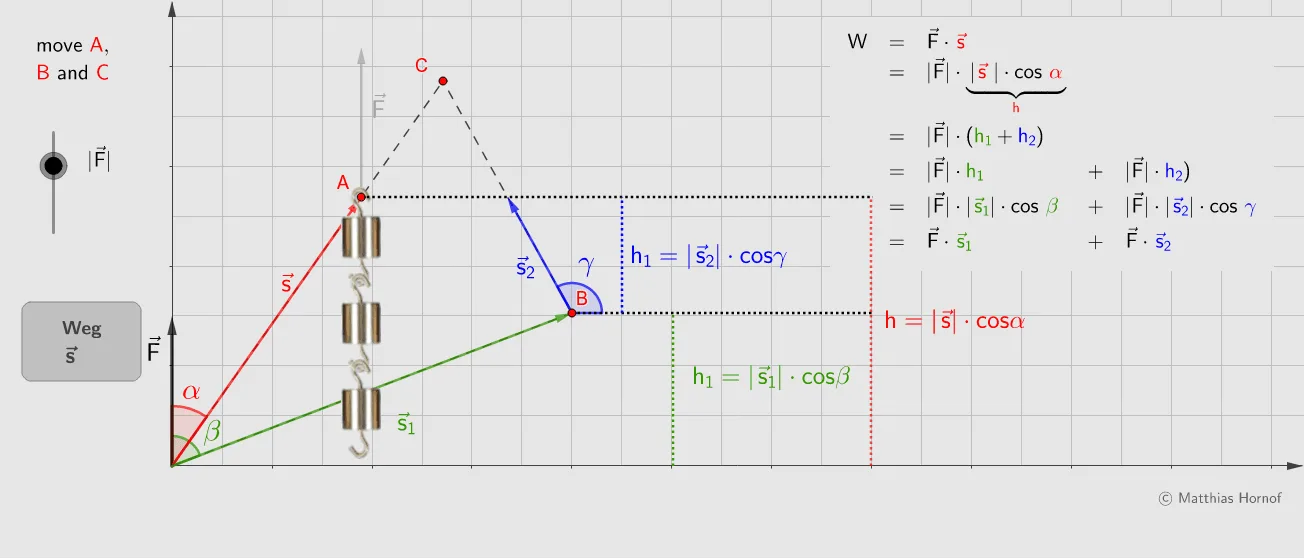
This example dynamically demonstrates the distributive law of the dot product for vectors: (u+v).w = u.w + v.w. It involves core math concepts like vector dot product, vector addition, and linear operations. Key GeoGebra commands used include Polygon, Point, Segment, Vector, Angle, with conditional logic (If) and polyline (PolyLine) for auxiliary constructions. Slider animations (Slider) allow interactive adjustment of vector magnitudes and directions. Suitable for high school students and university introductory courses in vector algebra and linear algebra.
GeoGebra Commands & Parameters
Polygon((0, 0), (0, 0) + (4, 0), (0, 0) + (4, 4.5), (0, 0) + (0, 4.5)) → V, g, i, j, kPoint(xAxis) → E_0PointIn(V) → CSegment((0, 0), C) → cPointIn(V) → BPoint(c) → S_2PolyLine((0, 0), B, C) → pPoint(p) → S_1If(wp, S_1, S_2) → SVector((0, 0), (0, y(A))) → fVector((0, 0), (0, 0) + (0, -1.72 / 2)) → v_xSegment(B, C) → bSegment((0, 0), B) → aVector((0, 0), S_2) → sIf(h_0 ≤ y(B), S_1, B) → DVector((0, 0), D) → s_1Vector(B, S_1) → s_2Angle(s_1, f) → βPoint(xAxis) → E_2Point(xAxis) → E_1Segment(E_1, E_1 + (0, y(B))) → h_1Point(xAxis) → E_3Segment((Min[x(S_2), x(S_1)], y(S)), E_0 + (0, y(S))) → levelSegment((x(B), y(B)), E_0 + (0, y(B))) → level_2Segment(C, E_0 + (0, y(C))) → level_3Segment((x(E_2), y(B)), E_2 + (0, y(S))) → h_2Segment(E_3, E_3 + (0, y(S))) → hAngle(Vector[B, B + (1, 0)], s_2) → γAngle(s, f) → αVector(S, S + (0, f_1 / 2)) → f_2If(y(C) ≥ y(B), "", "<0") → vzh
AI Drawing Prompt Reference
Draw a dynamic illustration showing the distributive law of the dot product for vectors (u+v).w = u.w + v.w. Include three vectors u, v, and w, visualizing the distributive law through vector addition, dot product, and linear operations. Use sliders to adjust vector magnitudes and directions, and draw auxiliary lines and angle markings to clearly show the calculation process and geometric relationships.
The prompt above was compiled from the original drawing commands and is for reference only.