
Vector Components
Loading the math board and drawing, please wait…
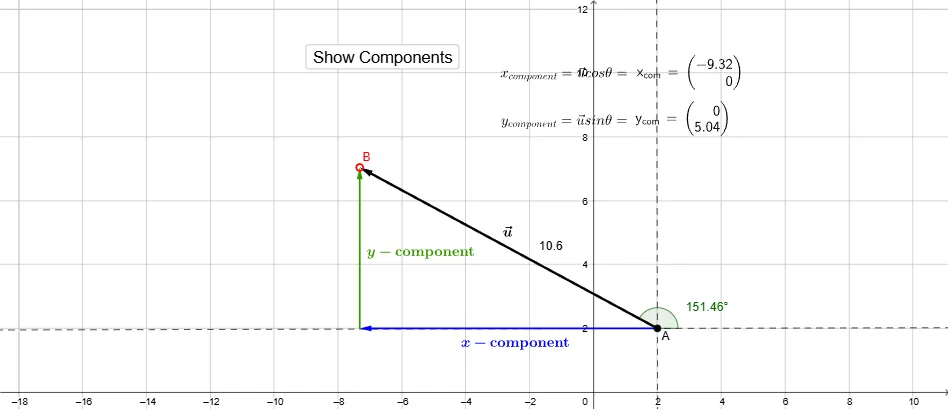
This example demonstrates defining a vector by moving point B and showing its magnitude and direction. Then, it calculates the X and Y components of the vector. Commands used include Vector, Segment, Point, Distance, Line, OrthogonalLine, Angle, and LaTeX. Suitable for high school math education and learning vector decomposition.
GeoGebra Commands & Parameters
Vector(A, B) → uSegment(A, C) → aPoint(a, t) → A'Segment(C, B) → bPoint(b, t - 1) → B'Vector(A, A') → x_{com}Vector(C, B') → y_{com}Distance(A, B) → distanceABLine(A, E) → fOrthogonalLine(A, f) → gAngle(E, A, B) → thetaDistance(A, B) → cLaTeX(x_{com}, true, true) → text4LaTeX(y_{com}, true, true) → text5
AI Drawing Prompt Reference
Draw vector u from point A to point B, showing its magnitude and direction. Construct the X and Y components of vector u, x_{com} and y_{com}, using segments AC and CB and their points A' and B'. Calculate the length of vector u, distanceAB, and mark the angle theta formed between vector u and segment AC.
The prompt above was compiled from the original drawing commands and is for reference only.