
Vector Addition: Parallelogram and Triangle Law Demonstration
Loading the math board and drawing, please wait…
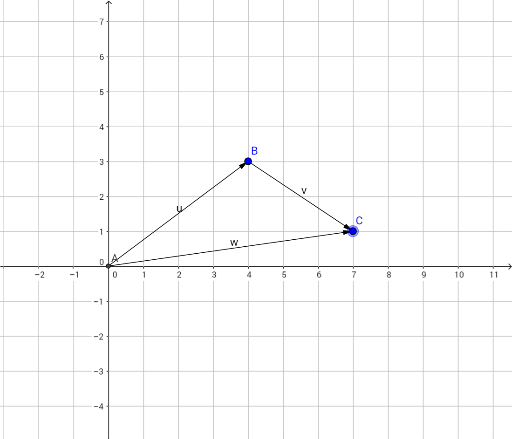
①This GeoGebra example dynamically demonstrates the addition of two vectors u and v to produce a resultant vector w, visually illustrating the geometric meaning of vector addition. ②Core mathematical concepts include vector addition via the triangle law (head-to-tail) and parallelogram law (common origin, diagonal), along with vector translation, collinearity, magnitude, and direction. ③Construction highlights: using GeoGebra's Intersect command to create intersection points, Vector command to define vectors u, v, and w, with points A, B, C as endpoints; dragging points or sliders allows real-time observation of how the sum changes. ④Suitable for high school or early college mathematics, ideal for intuitive understanding of vector operations, geometric construction practice, and as a supplementary tool for physics force composition and resolution.
GeoGebra Commands & Parameters
Intersect(xAxis, yAxis) → AVector(A, B) → uVector(B, C) → v
AI Drawing Prompt Reference
Draw a coordinate plane with an origin point. From the origin, draw a vector ending at a point, then from that point draw a second vector ending at another point. From the origin, draw a third vector to the final point, representing the sum of the first two. Also, using the origin as a common start, construct a parallelogram with the first two vectors as adjacent sides, and show its diagonal as the sum vector. Label the origin, intermediate point, and final point, and add arrows to all vectors to clearly illustrate both the triangle law and parallelogram law of vector addition.
The prompt above was compiled from the original drawing commands and is for reference only.