
Vector Addition Demonstration by Benjamin Messinger-Barnes
Loading the math board and drawing, please wait…
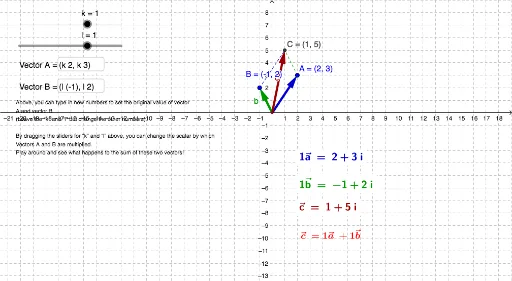
This example demonstrates the addition of two vectors in a 2D space, visually showing the result of vector addition. The core mathematical concepts involved include vectors, their geometric representation, and the parallelogram law of vector addition. The construction utilizes GeoGebra commands and objects such as Vector, Line, Intersect, Segment, and Textfield, allowing dynamic adjustment of vector magnitudes and directions via sliders, and displaying intersection points and loci. It is suitable for high school students learning about vectors and analytical geometry, helping to understand the geometric meaning of vector operations.
GeoGebra Commands & Parameters
Vector(A) → aVector(B) → bLine(B, a) → mLine(A, b) → nIntersect(m, n) → CSegment(A, C) → pSegment(B, C) → qTextfield(A) → InputBox1Textfield(B) → InputBox2