
Vector Addition by Martin Graham (2)
Loading the math board and drawing, please wait…
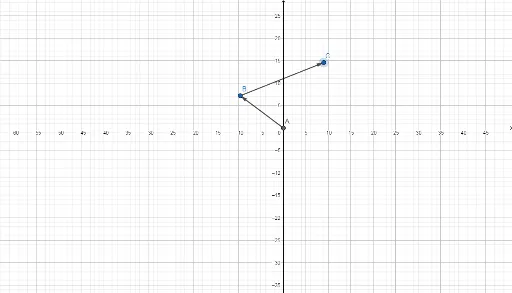
This example demonstrates the process of vector addition. It involves basic vector concepts and shows how to intuitively understand vector addition through geometric methods. Using GeoGebra commands such as Intersect, Circle, Point, and Vector, a geometric model of vector addition can be constructed. Suitable for high school mathematics teaching, particularly in coordinate geometry and vector courses.
GeoGebra Commands & Parameters
Intersect(xAxis, yAxis) → ACircle(A, 12) → cPoint(c) → BCircle(B, 20) → dVector(A, B) → uPoint(d) → CVector(B, C) → v
AI Drawing Prompt Reference
Draw a Cartesian coordinate system with the origin at the intersection of the axes. Center a circle of radius 12 at the origin and pick a point on its circumference as the tip of the first vector. Then draw a second circle of radius 20 centered at that point and choose a point on it as the tip of the second vector. Finally, draw the vector from the origin to the first point and the vector from the first point to the second point, illustrating the head‑to‑tail geometric addition of two vectors.
The prompt above was compiled from the original drawing commands and is for reference only.