
Vector Addition and Subtraction Simulation by Łukasz Krysiak
Loading the math board and drawing, please wait…
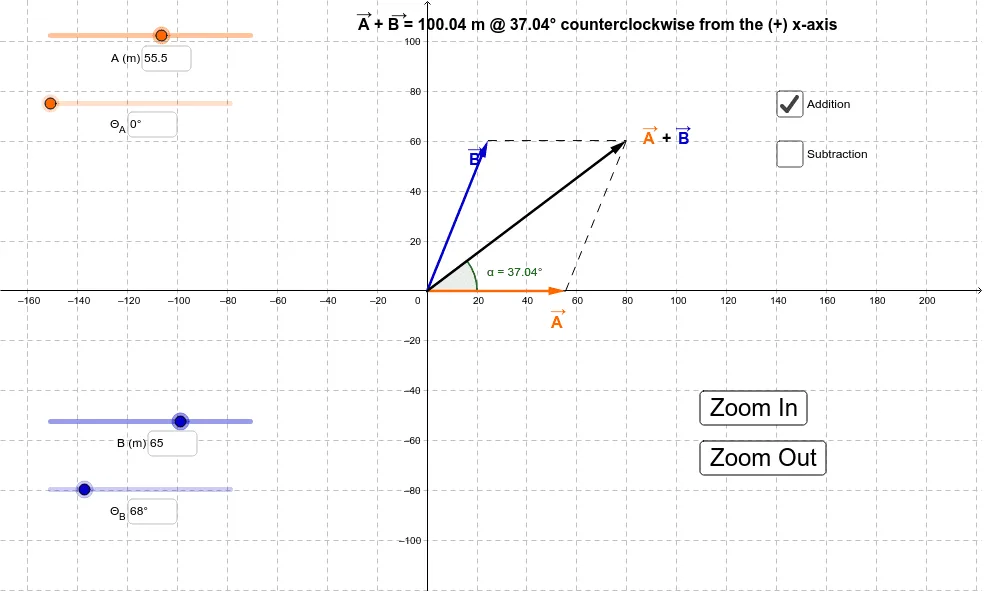
This is a simulation of vector addition and subtraction. It demonstrates the principles of vector addition and subtraction, involving basic vector concepts. Using commands like Intersect, Vector, If, etc., from the construction summary, one can understand the geometric representation and operations of vectors. Suitable for high school and above students to learn about vector knowledge.
GeoGebra Commands & Parameters
Intersect(xAxis, yAxis) → CVector(C, B) → uVector(C, A) → vIf(d, Vector[u + v], Vector[v - u]) → wTextfield(Θ_1) → InputBox1Textfield(Θ_1) → InputBox2Textfield(r_1) → InputBox3Textfield(Θ_2) → InputBox4Textfield(r_2) → InputBox5Segment(A, C) → aSegment(A, D) → bSegment(B, D) → cAngle((100, 0), (0, 0), D) → αSegment(E, D) → f
AI Drawing Prompt Reference
Draw a vector addition and subtraction simulation, including axes, origin O, points A, B, C, D, and E, and vectors u, v, and w. Start by drawing the x-axis and y-axis and finding their intersection point O. Then draw vectors u and v from O as the starting point. Based on the input of vector addition or subtraction, draw vector w. Finally, add angle α and segments a, b, c, and f to indicate the direction and relationship of the vectors.
The prompt above was compiled from the original drawing commands and is for reference only.