
Vector Addition and Subtraction Demonstration
Loading the math board and drawing, please wait…
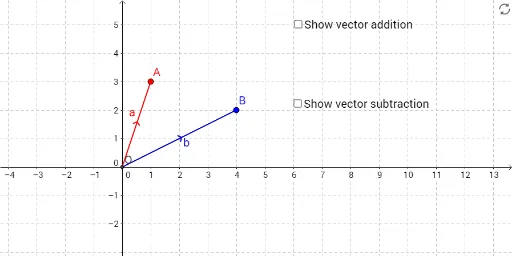
This example demonstrates vector addition and subtraction using GeoGebra. The key mathematical concepts involve vector synthesis and decomposition, and their geometric representation. Construction involves commands like Intersect, Vector, Translate, and Segment to create vector objects and illustrate their relationships. Suitable for middle or high school mathematics courses to understand vector operations intuitively.
GeoGebra Commands & Parameters
Intersect(xAxis, yAxis) → OVector(O, A) → aVector(O, B) → bTranslate(A, b) → A'Vector(A, A') → wTranslate(A, v_1) → A'_1Segment(O, A) → cSegment(O, B) → dSegment(O, A') → eSegment(A, A') → fSegment(A, A'_1) → gSegment(O, A'_1) → hVector(O, A') → a'Vector(O, A'_1) → a_1
AI Drawing Prompt Reference
Create a geometric demonstration of vector addition. Start with the origin point as the base, then draw two directed line segments from the origin representing vectors a and b pointing to different points A and B respectively. Translate point A along the direction of vector b to create point A', then draw a vector from the origin to A' representing the sum of vectors a and b. Show all connecting segments: from origin to A, origin to B, origin to A', and from A to A'. This forms a complete parallelogram structure illustrating the geometric meaning of vector addition, where a plus b equals the vector from the origin to A'.
The prompt above was compiled from the original drawing commands and is for reference only.