
Vasarely's Ara Inspiration
Loading the math board and drawing, please wait…
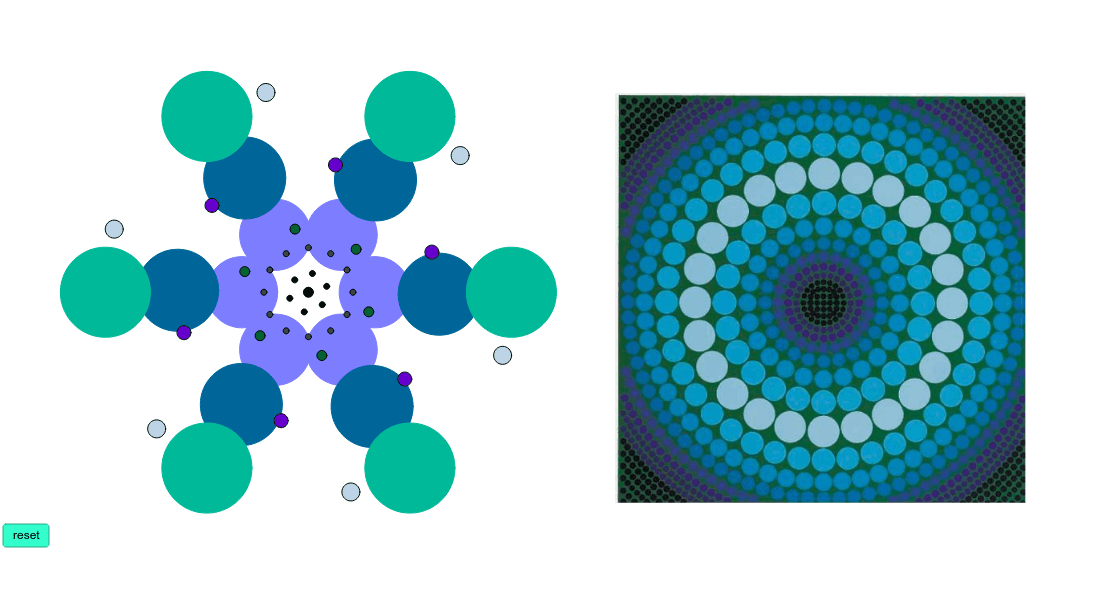
This example demonstrates the symmetry in Vasarely's Op Art, constructing complex visual patterns through rotations and reflections. It involves core mathematical concepts like dihedral group, rotations, reflections, and symmetry. The construction uses GeoGebra commands: Circle, Dilate, Rotate, Intersect, Ray, Point. Suitable for high school students learning geometric transformations, symmetry, and dihedral groups, or for interdisciplinary art and math education.
GeoGebra Commands & Parameters
Circle(A, B) → cDilate(c, k, C) → c'Circle(D, E) → dDilate(d, k, C) → d'Circle(F, G) → eDilate(e, k, C) → e'Rotate(c', 60*°, C) → c''Rotate(d', 60*°, C) → d''Rotate(e', 60*°, C) → e''Rotate(c'', 60*°, C) → c'''Rotate(d'', 60*°, C) → d'''Rotate(e'', 60*°, C) → e'''Rotate(c''', 60*°, C) → fRotate(d''', 60*°, C) → gRotate(e''', 60*°, C) → hRotate(f, 60*°, C) → f'Rotate(g, 60*°, C) → g'Rotate(h, 60*°, C) → h'Rotate(f', 60*°, C) → f''Rotate(g', 60*°, C) → g''Rotate(h', 60*°, C) → h''Intersect(c', c'', 1) → HRay(C, H) → aPoint(a) → ICircle(C, I) → pRotate(C, 30*°, C) → C'Rotate(H, 30*°, C) → H'Ray(C', H') → a'Rotate(C', 30*°, C) → C''Rotate(H', 30*°, C) → H''Ray(C'', H'') → a''Rotate(C'', 30*°, C) → C'''Rotate(H'', 30*°, C) → H'''Ray(C''', H''') → a'''Rotate(C''', 30*°, C) → JRotate(H''', 30*°, C) → KRay(J, K) → bRotate(J, 30*°, C) → J'Rotate(K, 30*°, C) → K'Ray(J', K') → b'Rotate(J', 30*°, C) → J''Rotate(K', 30*°, C) → K''Ray(J'', K'') → b''Rotate(J'', 30*°, C) → J'''Rotate(K'', 30*°, C) → K'''Ray(J''', K''') → b'''Rotate(J''', 30*°, C) → LRotate(K''', 30*°, C) → MRay(L, M) → iRotate(L, 30*°, C) → L'Rotate(M, 30*°, C) → M'Ray(L', M') → i'Rotate(L', 30*°, C) → L''Rotate(M', 30*°, C) → M''Ray(L'', M'') → i''Rotate(L'', 30*°, C) → L'''Rotate(M'', 30*°, C) → M'''Ray(L''', M''') → i'''Intersect(p, a', 1) → NIntersect(p, b', 1) → OIntersect(p, b''', 1) → PIntersect(p, i', 1) → QIntersect(p, i''', 1) → RIntersect(p, a''', 1) → SRotate(S, α, C) → S'Rotate(O, α, C) → O'Rotate(P, α, C) → P'Rotate(Q, α, C) → Q'Rotate(R, α, C) → R'Rotate(N, α, C) → N'Point(b') → WPoint(a''') → ZPoint(a') → A_1Point(i''') → B_1Point(i') → C_1Point(b''') → D_1Rotate(Z, (-α), C) → Z'Rotate(W, (-α), C) → W'Rotate(D_1, (-α), C) → TRotate(C_1, (-α), C) → URotate(B_1, (-α), C) → VRotate(A_1, (-α), C) → E_1Point(a''') → G_1Point(a') → H_1Point(i''') → I_1Point(i') → J_1Point(b''') → K_1Point(b') → L_1Rotate(G_1, α, C) → F_1Rotate(L_1, α, C) → M_1Rotate(K_1, α, C) → N_1Rotate(J_1, α, C) → O_1Rotate(I_1, α, C) → P_1Rotate(H_1, α, C) → Q_1Point(a''') → R_1Point(b') → S_1Point(a') → U_1Point(i''') → V_1Point(i') → T_1Point(b''') → W_1Rotate(R_1, (-α), C) → Z_1Rotate(W_1, (-α), C) → A_2Rotate(T_1, (-α), C) → B_2Rotate(V_1, (-α), C) → C_2Rotate(U_1, (-α), C) → D_2Rotate(S_1, (-α), C) → E_2Point(a'') → L_2Point(b) → G_2Circle(G_2, H_2) → qRotate(q, 120*°, C) → q'Rotate(q', 120*°, C) → q''Circle(C, I_2) → rCircle(C, J_2) → sCircle(C, K_2) → tIntersect(c'', c''', 2) → M_2Circle(C, M_2) → c_1
AI Drawing Prompt Reference
Create a complex visual pattern demonstrating symmetry through rotations and reflections, featuring multiple concentric circles and their scaled copies, which are then rotated multiple times to form a rotationally symmetric design. Finally, connect key points with rays to create a dynamic, artistic geometric structure.
The prompt above was compiled from the original drawing commands and is for reference only.