
Variable Cube
Loading the math board and drawing, please wait…
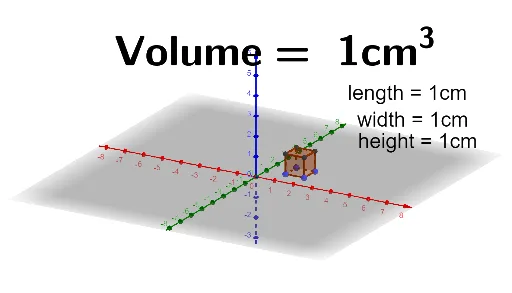
This example demonstrates a cube with variable parameters and its geometric properties. It involves core math concepts like solid geometry, integral calculus, coordinate geometry, and differential equations. Construction highlights include using GeoGebra commands such as Polygon, Prism, and Angle. Suitable for high school students and math enthusiasts exploring spatial geometry and calculus applications.
GeoGebra Commands & Parameters
Polygon(A, B, C, D) → q1, a, b, c, dPrism(q1, n) → f, I, edgeAI, edgeBJ, edgeCK, edgeDL, edgeIJ, edgeJK, edgeKL, edgeIL, J, K, L, faceABJI, faceBCKJ, faceCDLK, faceADLI, faceIJKLPolygon(E, F, G, H, M, N, O, P) → poly1, e_1, f_1, g, h, m, n_1, o, pPrism(poly1, 0) → i, Q, faceFGSR, faceGHTS, faceHMUT, faceMNVU, faceNOWV, faceOPZW, faceEPZQ, faceQRSTUVWZ, edgeEQ, edgeFR, R, edgeGS, edgeHT, edgeMU, edgeNV, edgeOW, edgePZ, edgeQR, edgeRS, edgeST, edgeTU, S_2, edgeUV, edgeVW, edgeWZ, edgeQZ, T, U, V, W, Z, faceEFRQPrism(faceQRSTUVWZ, k) → l, I_1, face12, face13, face14, face15, face16, face17, face11, face18, edge17, edge18, J_1, edge19, edge20, edge21, edge22, edge23, edge24, edge25, edge27, edge28, edge29, K_1, edge30, edge31, edge32, edge26, L_1, M_1, N_1, O_1, P_1, face10Polygon(A_1, B_1, 4) → poly2, q, r, s, t, C_1, D_1Polygon(E_1, F_1, 8) → poly3, g_1, H_1, Q_1, R_1, S_1, T_1, h_1, i_1, j_1, k_1, l_1, m_1, p_1, G_1Polygon(U_1, V_1, W_1, Z_1, A_2) → poly4, u_1, v_1, w_1, z_1, a_2Polygon(S, B_2, C_2, D_2, E_2) → poly5, s_1, b_2, c_2, d_2, e_2Angle(E_2, D_2, C_2) → αAngle(C_2, B_2, S) → βAngle(D_2, C_2, B_2) → γAngle(A_2, Z_1, W_1) → δAngle(W_1, V_1, U_1) → εAngle(Z_1, W_1, V_1) → ζPolygon(F_2, G_2, H_2) → t1, h_2, f_2, g_2Polygon(I_2, J_2, K_2) → t2, k_2, i_2, j_2
AI Drawing Prompt Reference
Draw a variable cube with its faces, edges, and vertices. Start by drawing a quadrilateral, then construct a prism based on it and adjust parameters to change the cube's size. Next, draw another quadrilateral and construct another prism, connecting the two prisms. Finally, add angle markings to demonstrate the spatial geometry of the cube.
The prompt above was compiled from the original drawing commands and is for reference only.