
Unit Circle, Radians, and Degrees Interactive Visualization
Loading the math board and drawing, please wait…
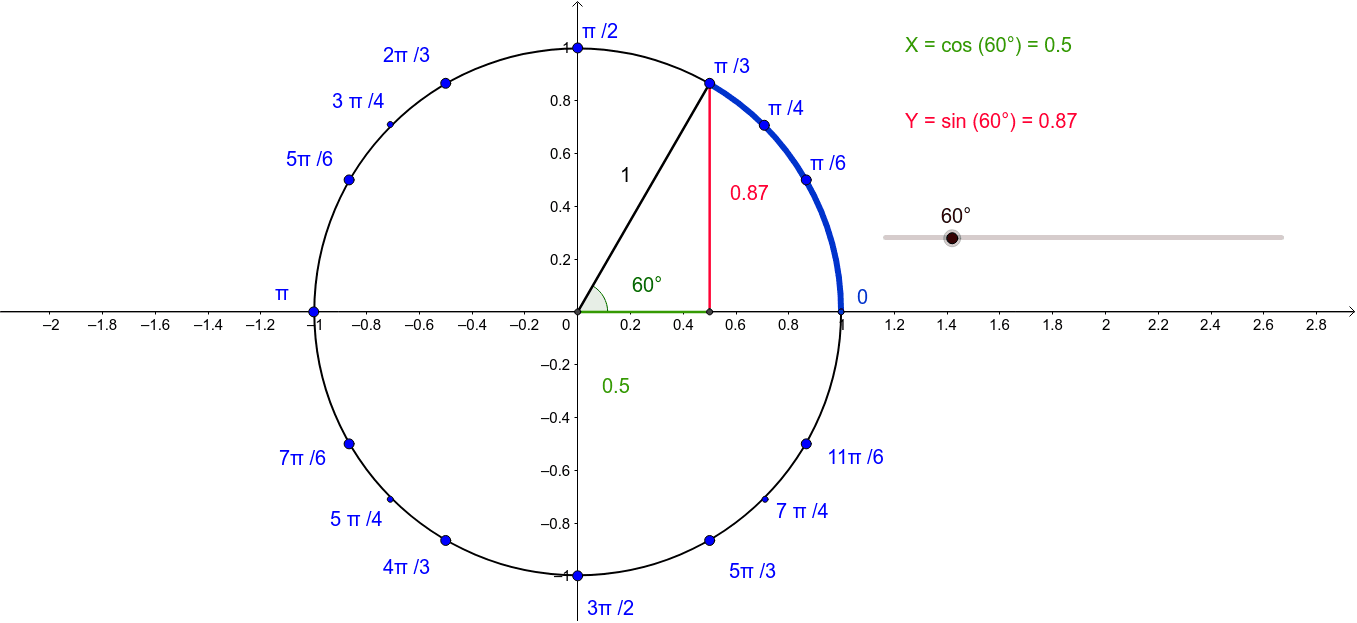
This GeoGebra example dynamically illustrates the relationship between angles, radians, and degrees on the unit circle, making the geometric meaning of trigonometric functions visually explicit. Core mathematical concepts include the unit circle definition, conversion between radians and degrees, geometric representation of sine, cosine, and tangent, and the connection between arc length and central angle. Construction highlights: the Intersect command finds circle-axis intersections, Circle draws the unit circle, Segment creates radii, Angle marks the central angle, and CircleArc traces the corresponding arc; sliders and text objects update angle values in real time. Suitable for high school and early college students learning trigonometry and radian measure, as well as for classroom demonstrations or self-study of angle conversion and periodic functions.
GeoGebra Commands & Parameters
Intersect(xAxis, yAxis) → ACircle(A, B) → cSegment(D, E) → fSegment(A, E) → gSegment(A, D) → hAngle(C, A, D) → βIntersect(c, k, 2) → NCircleArc(A, N, F) → dCircleArc(A, N, D) → e
AI Drawing Prompt Reference
Draw a unit circle centered at the origin with radius 1. From the center, draw two radii to points on the circle, forming an angle, and mark the corresponding arc with a curved line. Place a movable point on the circle that slides along the circumference, displaying its angle in both radians and degrees. Draw the horizontal and vertical axes, marking their intersections with the circle. Connect the center to the movable point and to another fixed point on the circle with line segments, forming a triangle. Add a slider to control the movable point's position, updating the angle and arc length in real time.
The prompt above was compiled from the original drawing commands and is for reference only.