
Unit Circle, Radians, and Degrees by Evan Schilling (3)
Loading the math board and drawing, please wait…
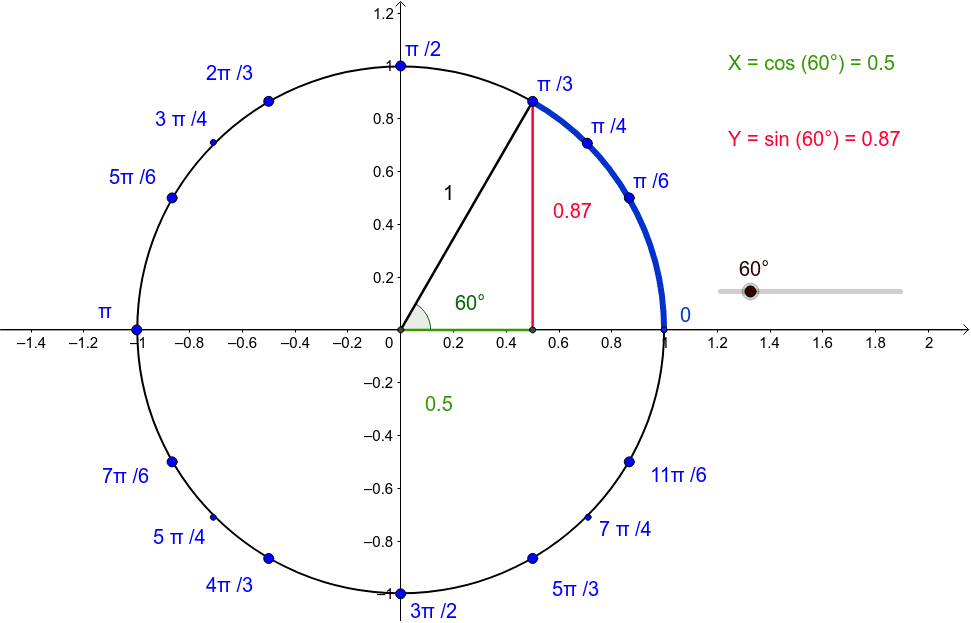
① This interactive GeoGebra example visually demonstrates the relationship between radians and degrees on the unit circle, showing how angles correspond to arc lengths and trigonometric values. ② Core mathematical concepts include the unit circle, radian measure, degree measure, trigonometric functions (sine, cosine, tangent), and the geometric interpretation of central angles. ③ Construction details: Using GeoGebra commands such as Intersect, Circle, Segment, Angle, and CircleArc, the construction includes a unit circle k, center B, a movable point A on the circle, angle α, arc c, and numerous auxiliary objects (points C, D, E, segments f, g, h, angle β, text labels text1 and text2, and many helper points F through U). By dragging point A or using a slider, the angle changes dynamically, and the corresponding radian and degree values are displayed in real time. ④ Suitable for high school or introductory college mathematics, this resource helps students grasp the definition of radians, convert between degrees and radians, and visualize trigonometric functions on the unit circle. It is ideal for classroom demonstrations or self-paced exploration.
GeoGebra Commands & Parameters
Intersect(xAxis, yAxis) → ACircle(A, B) → cSegment(D, E) → fSegment(A, E) → gSegment(A, D) → hAngle(C, A, D) → βIntersect(c, k, 2) → NCircleArc(A, N, F) → dCircleArc(A, N, D) → e
AI Drawing Prompt Reference
Draw a unit circle centered at the origin with a movable point on the circumference. Connect the center to this point with a radius, and display the angle between this radius and the positive x-axis. Highlight the corresponding arc in a distinct color or style, and show the angle value in both radians and degrees. Add auxiliary segments inside or outside the circle to represent sine, cosine, or tangent lengths, with text labels indicating the current angle. The diagram should clearly illustrate how the arc length and trigonometric values change as the point moves.
The prompt above was compiled from the original drawing commands and is for reference only.