
Unit Circle Quadrant 1: Sine, Cosine, and Right Triangle Relationships
Loading the math board and drawing, please wait…
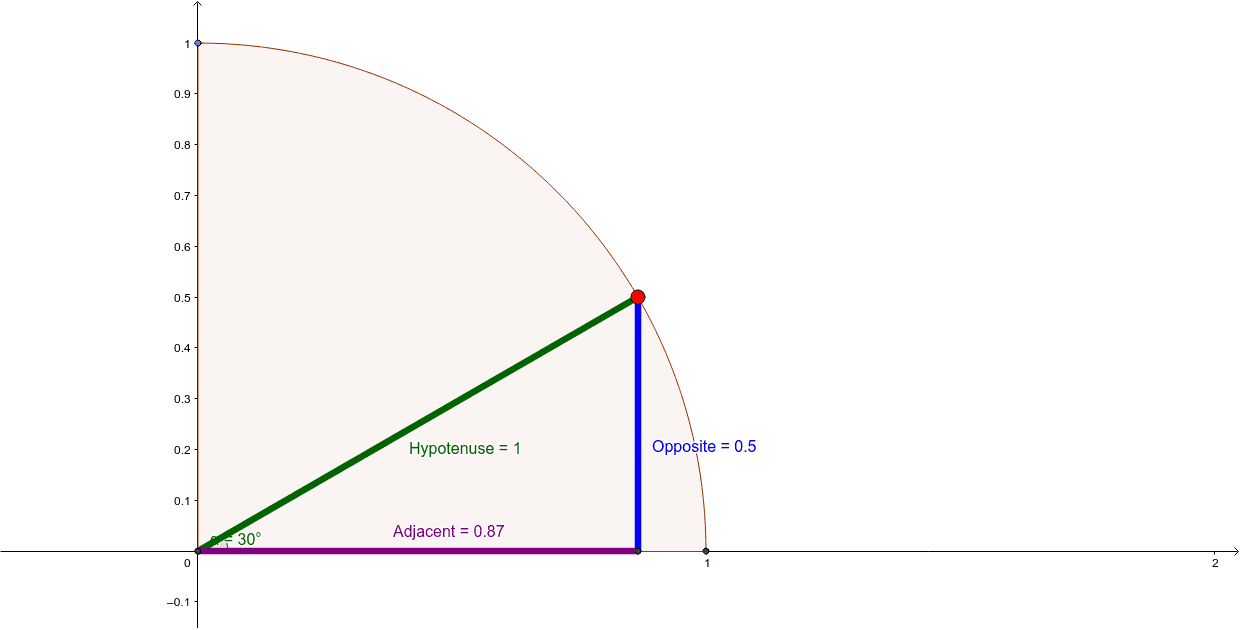
This GeoGebra example demonstrates the geometric correspondence between a point on the unit circle in the first quadrant and the right triangle formed by the radius, the x-axis, and a perpendicular segment, visually linking the point's coordinates to cosine and sine values. Core mathematical concepts include the unit circle, trigonometric functions (sine and cosine), right-triangle trigonometry, opposite and adjacent sides, hypotenuse, and the angle α in standard position. The construction employs GeoGebra commands such as Point, Intersect, CircleSector, Segment, OrthogonalLine, and Angle, together with objects A, B, C, c, D, Hypotenuse, E, b, d, F, Opposite, Adjacent, and α. It is suitable for high school trigonometry, introductory college precalculus, classroom demonstrations, and independent exploration of the relationship between unit-circle and right-triangle definitions of sine and cosine.
GeoGebra Commands & Parameters
Point(yAxis) → APoint(xAxis) → BIntersect(xAxis, yAxis) → CCircleSector(C, B, A) → cPoint(c) → DSegment(C, D) → HypotenuseIntersect(c, xAxis, 1) → EOrthogonalLine(D, xAxis) → bSegment(C, B) → dIntersect(b, d) → FSegment(D, F) → OppositeSegment(C, F) → AdjacentAngle(F, C, D) → α
AI Drawing Prompt Reference
Draw a unit circle sector in the first quadrant with its center at the origin, spanning from the positive x-axis to the positive y-axis. Place a point on the arc, then drop a perpendicular from this point to the x-axis, marking the foot on the x-axis. Connect the origin to the arc point to form the hypotenuse, the origin to the foot to form the adjacent side, and the foot to the arc point to form the opposite side, creating a right triangle. Label the angle at the origin between the adjacent side and the hypotenuse. Also show the x-axis, y-axis, and their intersection.
The prompt above was compiled from the original drawing commands and is for reference only.