
Unit Circle by Hand v2
Loading the math board and drawing, please wait…
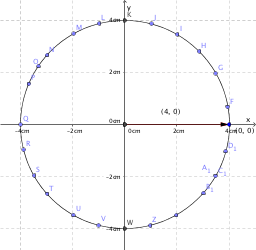
This example demonstrates how to manually draw a unit circle. Key mathematical concepts include the properties of circles and parametric equations. Using GeoGebra commands such as Intersect, Circle, and Vector, the construction process of the unit circle is dynamically shown. Suitable for high school mathematics education and learning, particularly for coordinate geometry and trigonometry.
GeoGebra Commands & Parameters
Intersect(xAxis, yAxis) → ACircle(A, B) → cVector(A, B) → uOrthogonalLine(B, xAxis) → aOrthogonalLine(B, yAxis) → bIntersect(b, yAxis) → CIntersect(xAxis, a) → DVector(C, B) → vVector(D, B) → wIntersect(c, xAxis, 2) → EPoint(c) → FPoint(c) → GPoint(c) → HPoint(c) → IPoint(c) → JIntersect(c, yAxis, 2) → KPoint(c) → LPoint(c) → MPoint(c) → NPoint(c) → OPoint(c) → PPoint(c) → QPoint(c) → RPoint(c) → SPoint(c) → TPoint(c) → UPoint(c) → VIntersect(c, yAxis, 1) → WPoint(c) → ZPoint(c) → A_1Point(c) → B_1Point(c) → C_1Point(c) → D_1
AI Drawing Prompt Reference
Draw a unit circle to demonstrate its manual construction. Start by plotting the intersection of the coordinate axes, then draw a circle centered at this point passing through another point. Next, draw a vector from the center to this point and create perpendicular lines to the axes from this point, connecting back to the center to form vectors. Finally, place multiple points evenly on the circle and mark the intersections with the axes, fully illustrating the geometric properties and parametric equations of the unit circle.
The prompt above was compiled from the original drawing commands and is for reference only.