
Radius in Right Triangles
Loading the math board and drawing, please wait…
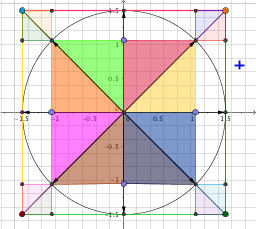
This example demonstrates the radius in right triangles. It involves basic concepts of right triangles and circles. Using GeoGebra commands such as Segment, Intersect, OrthogonalLine, Circle, etc., the construction of the radius in right triangles is illustrated. Suitable for middle and high school students learning geometric construction.
GeoGebra Commands & Parameters
Segment(C, D) → fSegment(D, E) → gSegment(E, F) → hSegment(F, C) → iSegment(D, F) → jSegment(D, F) → kSegment(C, E) → lIntersect(k, l) → GOrthogonalLine(G, g) → mIntersect(m, g) → HIntersect(m, i) → ICircle(G, 1.5) → cIntersect(c, f, 1) → JIntersect(c, h, 1) → KVector(G, I) → uVector(G, J) → vVector(G, H) → wVector(G, K) → dIntersect(c, l, 1) → LIntersect(c, k, 1) → MIntersect(c, l, 2) → NIntersect(c, k, 2) → OVector(G, M) → eVector(G, L) → nVector(G, N) → pVector(G, O) → qOrthogonalLine(M, v) → rOrthogonalLine(M, xAxis) → sOrthogonalLine(N, d) → tOrthogonalLine(O, u) → f_1Point(u) → PPolygon(L, P, G) → poly1, g_1, l_1, p_1Point(v) → QPolygon(L, Q, G) → poly2, g_2, l_2, q_1Polygon(Q, M, G) → poly3, g_3, q_2, m_1Point(w) → RPolygon(M, R, G) → poly4, g_4, m_2, r_1Polygon(R, N, G) → poly5, g_5, r_2, n_1Point(d) → SPolygon(N, S, G) → poly6, g_6, n_2, s_1Polygon(G, S, O) → poly7, o, g_7, s_2Polygon(G, P, O) → poly8, o_1, g_8, p_2Intersect(f_1, h) → TPolygon(O, T, F) → poly9, f_2, o_2, t_1Intersect(t, i) → UPolygon(O, U, F) → poly10, f_3, o_3, u_1Intersect(r, i) → VPolygon(C, L, V) → poly11, v_1, c_1, l_3Intersect(f_1, f) → WPolygon(W, L, C) → poly12, c_2, w_1, l_4Intersect(s, f) → ZPolygon(Z, M, D) → poly13, d_1, z_1, m_3Intersect(r, g) → A_1Polygon(D, A_1, M) → poly14, m_4, d_2, a_1Intersect(t, g) → B_1Polygon(N, B_1, E) → poly15, e_1, n_3, b_1Intersect(s, h) → C_1Polygon(N, E, C_1) → poly16, c_3, n_4, e_2
AI Drawing Prompt Reference
Draw a right triangle with its hypotenuse and two legs marked. Then, draw a circle centered at the right-angled vertex that is tangent to the hypotenuse, marking the points of tangency. Next, draw vectors from the center of the circle to the three vertices of the triangle and to the points of tangency. Finally, connect the intersection points of the circle with the triangle's boundaries to form several small polygons, illustrating the relationship between the circle and the right triangle.
The prompt above was compiled from the original drawing commands and is for reference only.