
Fermat Point - Associated Equilateral Triangle
Loading the math board and drawing, please wait…
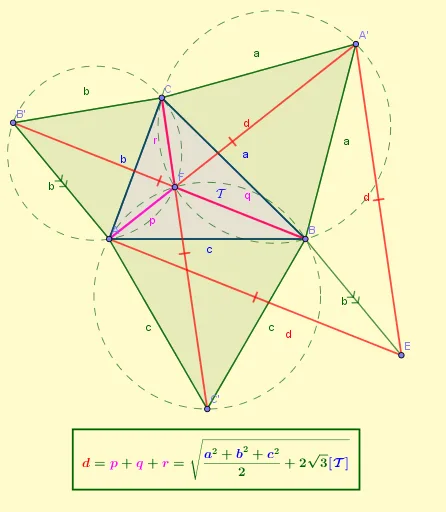
This example demonstrates the relationship between the Fermat Point and an equilateral triangle, highlighting the special position of the Fermat Point within the triangle. Key mathematical concepts include the Fermat Point, equilateral triangles, vectors, coordinate geometry, and geometric construction. The construction utilizes GeoGebra commands and objects such as Polygon, Circle, Segment, Intersect, Vector, and Translate, as outlined in the summary. It is suitable for high school and above students to understand the application and construction of the Fermat Point in geometry.
GeoGebra Commands & Parameters
Polygon(A, B, C) → t1, c, a, bPolygon(C, B, 3) → ta, f, g, h, A'Circle(B, A', C) → d_1Segment(A, A') → dIntersect(d_1, d, 2) → FSegment(A, F) → pSegment(B, F) → qSegment(C, F) → rPolygon(A, C, 3) → tb, j, k, l, B'Polygon(B, A, 3) → tc, m, n, c_2, C'Segment(B', B) → tSegment(C, C') → f_1Vector(B', A) → uTranslate(B', u) → E'Translate(B, u) → ESegment(E', E) → t'Vector(C, A') → vTranslate(C, v) → C'_1Translate(C', v) → G'Segment(C'_1, G') → g_1Segment(B, E) → b_2Circle(C', B, A) → sCircle(A, C, B') → c_1
AI Drawing Prompt Reference
Draw triangle ABC, then construct a circle with B as the center and A' on the circumference, and draw the line segment from A to A'. Find the intersection of this line segment with the circle to get point F. Draw line segments from A to F, B to F, and C to F. Next, construct triangles ACB' and BAC', draw line segments from B' to B and C to C', and vectors from B' to A and C to A'. Use these vectors to translate B' to E' and C to G', and finally draw line segments from E' to E and C' to G'.
The prompt above was compiled from the original drawing commands and is for reference only.