
Unit Circle and Trigonometric Ratios
Loading the math board and drawing, please wait…
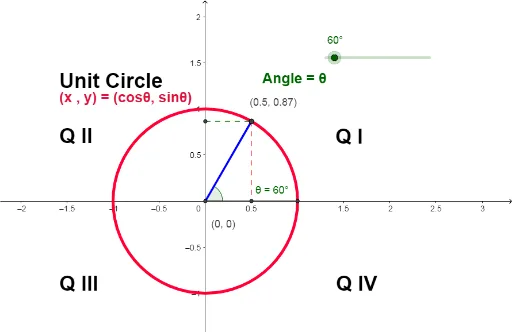
This example demonstrates the relationship between the unit circle and trigonometric ratios. By rotating points and constructing segments, it shows the correspondence between angles and trigonometric function values. Commands used include Intersect, Segment, Rotate, Angle, etc. Suitable for high school math education to help students understand basic trigonometric concepts.
GeoGebra Commands & Parameters
Intersect(xAxis, yAxis) → AIntersect(c, xAxis, 2) → BSegment(A, B) → aRotate(B, θ_1, A) → B'Segment(B', A) → bRotate(B, θ_1, A) → B'_1Angle(B, A, B'_1) → θName(θ) → A1OrthogonalLine(B', a) → dIntersect(d, a) → CSegment(B', C) → eOrthogonalLine(B', yAxis) → gIntersect(g, yAxis) → DSegment(D, B') → h
AI Drawing Prompt Reference
Draw a unit circle and demonstrate the relationship between sine and cosine by rotating a point on the circle. Start by marking the intersection of the x-axis and y-axis as point A, then find the intersection of the unit circle and x-axis as point B, and draw line segment a connecting A and B. Rotate point B around point A to get point B', draw line segment b connecting A and B', and measure the angle ∠BAB' as θ. Draw a line perpendicular to a through B' to get line d, and find its intersection with a as point C, then draw line segment e connecting B' and C. Finally, draw a line perpendicular to B' through y-axis to get line g, and find its intersection with the y-axis as point D, then draw line segment h connecting D and B'.
The prompt above was compiled from the original drawing commands and is for reference only.