
Unit Circle and Its Geometric Properties
Loading the math board and drawing, please wait…
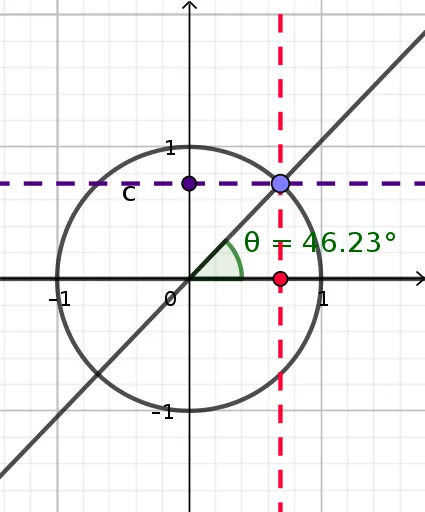
This example demonstrates the basic geometric properties of the unit circle, including its center, radius, and coordinate points. The key mathematical concepts involve the equation of a circle, coordinate systems, and geometric transformations. Construction points include using GeoGebra commands such as Intersect, Circle, Point, etc. to create the circle and related figures. Suitable for middle school students learning geometric foundations or for mathematical teaching assistance.
GeoGebra Commands & Parameters
Intersect(xAxis, yAxis) → ACircle(A, B) → cPoint(c) → CLine(A, B) → fLine(A, C) → gAngle(f, g) → θOrthogonalLine(C, f) → hOrthogonalLine(C, yAxis) → iIntersect(f, h) → FIntersect(i, yAxis) → G
AI Drawing Prompt Reference
Draw a unit circle, marking its center, radius, and coordinate points. Start by plotting the intersection of the coordinate axes, then draw a circle centered at this point. Next, select an arbitrary point on the circle and connect it to the center, forming a right triangle with the radius. Draw a line perpendicular to the x-axis through the center, and find its intersections with the previous lines to get two points. Clearly display all the points, the circle, axes, and lines as geometric elements.
The prompt above was compiled from the original drawing commands and is for reference only.