
Unicode Character Table: An Interactive Encoding Explorer Built with GeoGebra
Loading the math board and drawing, please wait…
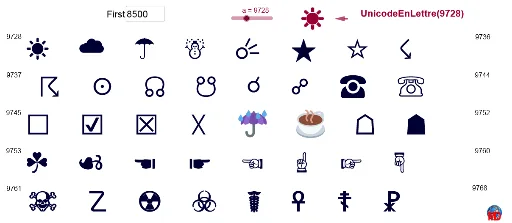
① This example demonstrates how to build an interactive Unicode character table in GeoGebra, allowing users to input a character or code to see its corresponding Unicode information and visualize the mapping between characters and numeric encodings. ② Core mathematical concepts include numeric representation of character codes (decimal/hexadecimal), sequence generation, organization of data using vectors and tables, and dynamic linking between text and mathematical objects. ③ Construction highlights: from the summary, it uses Sequence to generate character sequences, Textfield for input boxes, TableText to arrange data into tables, UnicodeToLetter to convert codes to characters, and Vector for vector data; objects include multiple texts (texte1~texte17), input fields (ChampTexte1, ChampTexte2), lists (liste2), and variables (min, u), enabling dynamic updates for interactive queries. ④ Suitable for middle school and above in computer science or math enrichment classes, to understand character encoding principles, data visualization, and GeoGebra's text/table capabilities, also useful as a programming primer.
GeoGebra Commands & Parameters
Sequence(n, n, A1, B1, 1) → liste2Textfield(A1) → ChampTexte1TableText({Sequence[UnicodeToLetter[Element[liste2, i]], i, 1, 8]}) → texte1TableText({Sequence[UnicodeToLetter[Element[liste2, i]], i, 9, 16]}) → texte2TableText({Sequence[UnicodeToLetter[Element[liste2, i]], i, 17, 24]}) → texte3TableText({Sequence[UnicodeToLetter[Element[liste2, i]], i, 25, 32]}) → texte4TableText({Sequence[UnicodeToLetter[Element[liste2, i]], i, 33, 40]}) → texte15Textfield(min) → ChampTexte2UnicodeToLetter(a) → texte14Vector(I, H) → u
AI Drawing Prompt Reference
Create an interactive Unicode character table layout. Place an input field at the top for entering a starting code, with another numeric input beside it to adjust the range. Below, generate a grid of multiple table rows, each showing 8 characters in sequential order, converted from their numeric codes. Under the tables, display a single character converted from a specific input code. Include several text labels and tables, plus an arrow vector connecting two points to indicate the mapping between characters and codes. All elements are dynamically linked, updating as inputs change.
The prompt above was compiled from the original drawing commands and is for reference only.