
Unfolding a Cube: Constructing an “Opened” Net via 3D Geometry
Loading the math board and drawing, please wait…
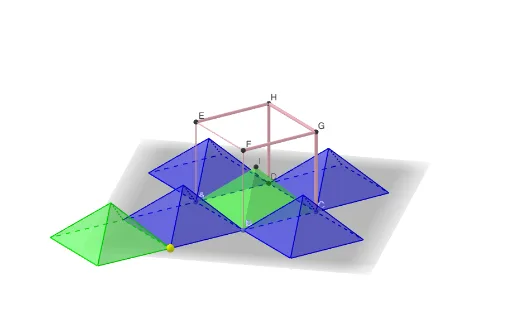
This example demonstrates how to construct and visualize an “opened” (unfolded) cube by systematically rotating and mirroring its faces around their shared edges. It transforms a 3D cube into a planar arrangement that preserves adjacency and hinge relationships between faces. Key concepts include solid geometry (cube faces and edges), angle constraints along common edges, and geometric transformations (rotations/mirrors) that map spatial relations to the unfolded configuration. Construction approach in GeoGebra: create points and the cube with Point and Cube; use Midpoint for reference geometry; employ Pyramid and Circle to support auxiliary structure and rotation placement; measure and specify hinge angles with Angle; perform the unfolding motions using Rotate; set up controlling references with Line and OrthogonalPlane; and generate corresponding mirrored face placements using Mirror. The construction tracks multiple named faces (e.g., faceABCD, faceADHE, faceABFE, faceBCGF, faceCDHG, faceEFGH) together with relevant edges (e.g., edgeAB, edgeAD, edgeBC, edgeCD, edgeCG, edgeGH) and uses a parameterized rotation angle (α) to control the opened state. Suitable for middle school to early university learners studying spatial geometry, cube nets, and transformation-based geometric modeling.
GeoGebra Commands & Parameters
Point(xAxis) → APoint(yAxis) → BPoint(Circle[B, Distance[A, B], Segment[A, B]]) → CCube(A, B, C) → a, D, faceCDHG, faceEFGH, edgeAD, edgeAB, edgeBC, edgeCD, edgeAE, edgeDH, edgeEH, edgeEF, E, edgeBF, edgeFG, edgeCG, edgeGH, F, G, H, faceABCD, faceADHE, faceABFE, faceBCGFMidpoint(D, F) → IPyramid(faceABCD, I) → b, faceADI, faceABI_1, faceBCI, faceCDI, edgeDI, edgeAI_1, edgeBI_1, edgeCICircle(edgeAB, F) → cPoint(c) → JAngle(F, B, J) → αPyramid(faceABFE, I) → d, faceABI, faceAEI, faceEFI, faceBFI, edgeBI, edgeAI, edgeEI, edgeFIRotate(d, α, edgeAB) → d'Rotate(d', 90°, zAxis) → d''Rotate(d'', 90°, zAxis) → d'''Rotate(d''', 90°, zAxis) → eLine(B, J) → fMidpoint(B, J) → KOrthogonalPlane(K, f) → gMirror(b, g) → b'
AI Drawing Prompt Reference
Draw a 3D cube and unfold its six faces into a planar net by rotating them around shared edges. Start with a cube, then construct an auxiliary pyramid on one face for positioning. Pick a point on a base edge and use it with an adjacent vertex to define a rotation angle that controls the unfolding. Rotate the adjacent face around the shared edge by that angle, then rotate it three times around the vertical axis to place the next faces. Finally, create a symmetry plane using a line and its midpoint, and mirror the auxiliary pyramid to complete the opposite part. The final figure shows the cube partially opened, with named faces and edges, and a parameter for the opening angle.
The prompt above was compiled from the original drawing commands and is for reference only.