
U4 Review: Geometric Dilations and Transformations
Loading the math board and drawing, please wait…
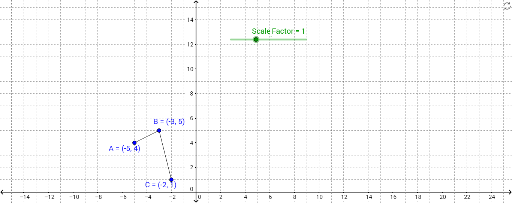
This GeoGebra example demonstrates geometric dilations (scaling transformations) applied to triangles, segments, and lines, visualizing how figures scale dynamically based on a scale factor. The core mathematical concepts include similarity, scale factors, center of dilation, and coordinate-based transformation geometry. In terms of construction, the example utilizes key commands such as `Segment` to define basic edges, `Intersect` to find geometric crossings, and the central `Dilate` command to scale objects. By adjusting the slider `Scale_.Factor`, users can dynamically generate the dilated images of vertices A, B, C and lines f, g, resulting in primed points A', B', C' and lines g'. This resource is ideal for high school geometry students reviewing similarity and transformations, as well as for GeoGebra users looking to master dynamic geometric construction techniques.
GeoGebra Commands & Parameters
Segment(A, B) → fSegment(B, C) → gIntersect(xAxis, yAxis) → FDilate(B, Scale_.Factor, F) → B'Dilate(C, Scale_.Factor, F) → C'Segment(B', C') → g'Dilate(A, Scale_.Factor, F) → A'Segment(B', A') → h
AI Drawing Prompt Reference
Draw a triangle ABC, connect points B and C to form line g, and connect points A and B to form line f. Use the origin as the center of dilation and the slider's scale factor to enlarge triangle ABC into triangle A'B'C', then connect points B' and C' to form line g', and connect points A and B' to form line h.
The prompt above was compiled from the original drawing commands and is for reference only.