
Two Parts of a Cube (3) – 3D Division and Geometric Construction
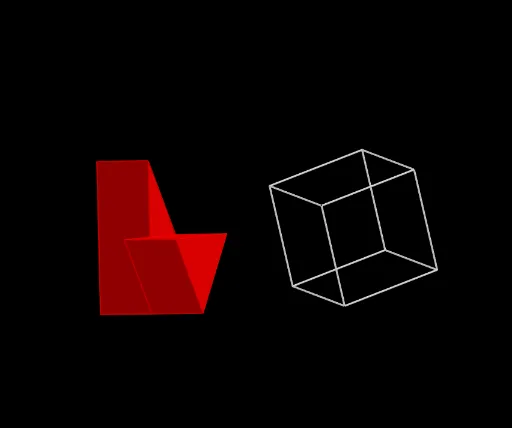
Loading the math board and drawing, please wait…
In collections
TWO PARTS OF A CUBE
This example demonstrates the division of a cube into two parts in three-dimensional space, highlighting the relationships between cutting planes, edges, and faces. Core mathematical concepts include solid geometry properties of cubes, midpoints, vectors, translations, rotations, and prism construction. Construction details: using GeoGebra commands Point, Cube, Midpoint, Line, Vector, Translate, Rotate, and Prism, with objects such as vertices A-H, faces like faceABCD, edges like edgeAD, and auxiliary points L, M, N. The division is determined via midpoints and vectors, then the two parts are formed as prisms through rotation and translation. Suitable for high school or university solid geometry instruction, as well as spatial reasoning and geometric construction practice.
GeoGebra Commands & Parameters
Point(xAxis) → APoint(xAxis) → BPoint(Circle[B, Distance[A, B], Segment[A, B]]) → CCube(A, B, C) → c, D, faceCDHG, faceEFGH, edgeAD, edgeAB, edgeBC, edgeCD, edgeAE, edgeDH, edgeEH, edgeEF, E, edgeBF, edgeFG, edgeCG, edgeGH, F, G, H, faceABCD, faceADHE, faceABFE, faceBCGFPoint(xAxis) → LPoint(xAxis) → MPoint(Circle[M, Distance[L, M], Segment[L, M]]) → NCube(L, M, N) → k, O, faceNOSR, facePQRS, edgeLO, edgeLM, edgeMN, edgeNO, edgeLP, edgeOS, edgePS, edgePQ, P, edgeMQ, edgeQR, edgeNR, edgeRS, Q, R, S, faceLMNO, faceLOSP, faceLMQP, faceMNRQMidpoint(H, B) → S_2Midpoint(S, M) → S_1Line(S_1, S_2) → p_1Line(S_2, yAxis) → fLine(S_1, yAxis) → gLine(S_2, zAxis) → hLine(S_1, zAxis) → iPoint(p_1) → IPoint(p_1) → JVector(I, J) → uTranslate(i, Vector[(p * u)]) → i'Translate(g, Vector[(p * u)]) → g'Rotate(A, α, p_1) → A'Rotate(B, α, p_1) → B'Rotate(C, α, p_1) → C'Rotate(D, α, p_1) → D'Rotate(E, α, p_1) → E'Rotate(F, α, p_1) → F'Rotate(G, α, p_1) → G'Rotate(H, α, p_1) → H'Rotate(A', β, f) → A''Rotate(B', β, f) → B''Rotate(C', β, f) → C''Rotate(D', β, f) → D''Rotate(E', β, f) → E''Rotate(F', β, f) → F''Rotate(G', β, f) → G''Rotate(H', β, f) → H''Translate(k, Vector[(p * u)]) → k'Translate(L, Vector[(p * u)]) → L'Translate(M, Vector[(p * u)]) → M'Translate(N, Vector[(p * u)]) → N'Translate(O, Vector[(p * u)]) → O'Translate(P, Vector[(p * u)]) → P'Translate(Q, Vector[(p * u)]) → Q'Translate(R, Vector[(p * u)]) → R'Translate(S, Vector[(p * u)]) → S'Rotate(c, α, p_1) → c'Rotate(c', β, f) → c''Rotate(G'', γ, h) → G'''Rotate(H'', γ, h) → H'''Rotate(E'', γ, h) → E'''Rotate(F'', γ, h) → F'''Rotate(D'', γ, h) → D'''Rotate(C'', γ, h) → C'''Rotate(A'', γ, h) → A'''Rotate(B'', γ, h) → B'''Rotate(c'', γ, h) → c'''Rotate(k', δ, p_1) → k''Rotate(L', δ, p_1) → L''Rotate(M', δ, p_1) → M''Rotate(N', δ, p_1) → N''Rotate(O', δ, p_1) → O''Rotate(P', δ, p_1) → P''Rotate(Q', δ, p_1) → Q''Rotate(R', δ, p_1) → R''Rotate(S', δ, p_1) → S''Rotate(k'', ε, g') → k'''Rotate(L'', ε, g') → L'''Rotate(M'', ε, g') → M'''Rotate(N'', ε, g') → N'''Rotate(O'', ε, g') → O'''Rotate(P'', ε, g') → P'''Rotate(Q'', ε, g') → Q'''Rotate(R'', ε, g') → R'''Rotate(S'', ε, g') → S'''Rotate(k''', ζ, i') → aRotate(L''', ζ, i') → KRotate(M''', ζ, i') → TRotate(N''', ζ, i') → URotate(O''', ζ, i') → VRotate(P''', ζ, i') → WRotate(Q''', ζ, i') → ZRotate(R''', ζ, i') → A_1Rotate(S''', ζ, i') → B_1Midpoint(H''', G''') → C_1Midpoint(E''', F''') → D_1Midpoint(D''', C''') → E_1Midpoint(A''', B''') → F_1Midpoint(A''', D''') → G_1Midpoint(E''', H''') → H_1Midpoint(F''', G''') → I_1Midpoint(B''', C''') → J_1Midpoint(C_1, D_1) → K_1Midpoint(C_1, E_1) → L_1Midpoint(G_1, H_1) → M_1Midpoint(D_1, F_1) → N_1Midpoint(J_1, I_1) → O_1Midpoint(G_1, J_1) → P_1Midpoint(V, T) → Q_1Midpoint(B_1, Z) → R_1Midpoint(A_1, T) → T_1Midpoint(B_1, U) → U_1Midpoint(B_1, K) → V_1Midpoint(Z, K) → W_1Midpoint(B_1, A_1) → Z_1Midpoint(A_1, Z) → A_2Midpoint(Z, W) → B_2Midpoint(V, U) → C_2Midpoint(K, T) → D_2Midpoint(T, U) → E_2Midpoint(V, K) → F_2Midpoint(B_1, W) → G_2Midpoint(Z, T) → H_2Midpoint(K, W) → I_2Midpoint(B_1, V) → J_2Midpoint(U, A_1) → K_2Midpoint(G''', C''') → L_2Midpoint(D''', H''') → M_2Midpoint(A''', E''') → N_2Midpoint(F''', B''') → O_2Prism(D''', A''', B''', M_2) → b, P_2, edgeB'''D''', edge1, edge2, edge3, edge4, edge6, edge5, Q_2, faceA'''B'''D''', face2, face4, face3, face1, edgeA'''D''', edgeA'''B'''Prism(M_2, L_2, P_2, H''') → d, R_2, edge13, edge7, edge12, edge14, edge8, edge15, edge9, T_2, face6, face7, face9, face8, face5, edge10, edge11Prism(V, T, U, J_2) → e, U_2, edgeUV, edge18, edge16, edge17, edge19, edge21, edge20, V_2, faceTUV, face12, face11, face13, face10, edgeTV, edgeTUPoint(edge21) → W_2Prism(K, Q_1, T, I_2) → j, Z_2, edgeKT, edge23, edge26, edge25, edge27, edge29, edge28, A_3, face14, face17, face18, face16, face15, edge22, edge24Prism(I_2, V_2, A_3, W) → l, B_3, edge34, edge30, edge36, edge37, edge31, edge38, edge32, C_3, face20, face21, face23, face22, face19, edge33, edge35Prism(W, V_1, B_1, Z) → n, D_3, edge39, edgeWZ, edge45, edge44, edge41, edge46, edge42, E_3, face24, face26, face28, face27, face25, edge40, edge43Prism(V, B_1, V_1, C_2) → o, F_3, edge48, edge49, edge51, edge52, edge53, edge55, edge54, G_3, face29, face31, face33, face32, face30, edge47, edge50Prism(W, V_1, K, B_2) → q, H_3, edgeKW, edge59, edge60, edge57, edge61, edge63, edge62, I_3, face34, face38, face37, face36, face35, edge58, edge56Prism(K, B_1, V, D_2) → s, J_3, edgeKV, edge65, edge68, edge67, edge69, edge71, edge70, K_3, face39, face42, face43, face41, face40, edge64, edge66Prism(B_1, V_1, W, A_1) → t, L_3, edge72, edge75, edge79, edge74, edge76, edge80, edge77, M_3, face44, face48, face47, face46, face45, edge78, edge73Prism(W, V, B_1, B_2) → w, N_3, edge83, edge84, edge82, edge85, edge86, edge88, edge87, O_3, face49, face51, face52, face53, face50, edgeVW, edge81Prism(O_3, N_3, D_2, A_1) → a_1, P_3, edge93, edge89, edge96, edge94, edge90, edge97, edge91, Q_3, face55, face57, face58, face56, face54, edge95, edge92
AI Drawing Prompt Reference
Visualize the division of a cube into two parts in 3D space, highlighting the relationships between cutting planes, edges, and faces. Start by constructing two cubes, then find midpoints of key vertices and draw lines connecting them. Use vectors and midpoints to determine the cutting direction, and split the cube into two parts through rotation and translation, forming new prisms. Finally, display the two resulting parts and their relationship with the original cube, emphasizing geometric construction and spatial geometry properties.
The prompt above was compiled from the original drawing commands and is for reference only.