
Trisecting a Rectangular Prism
Loading the math board and drawing, please wait…
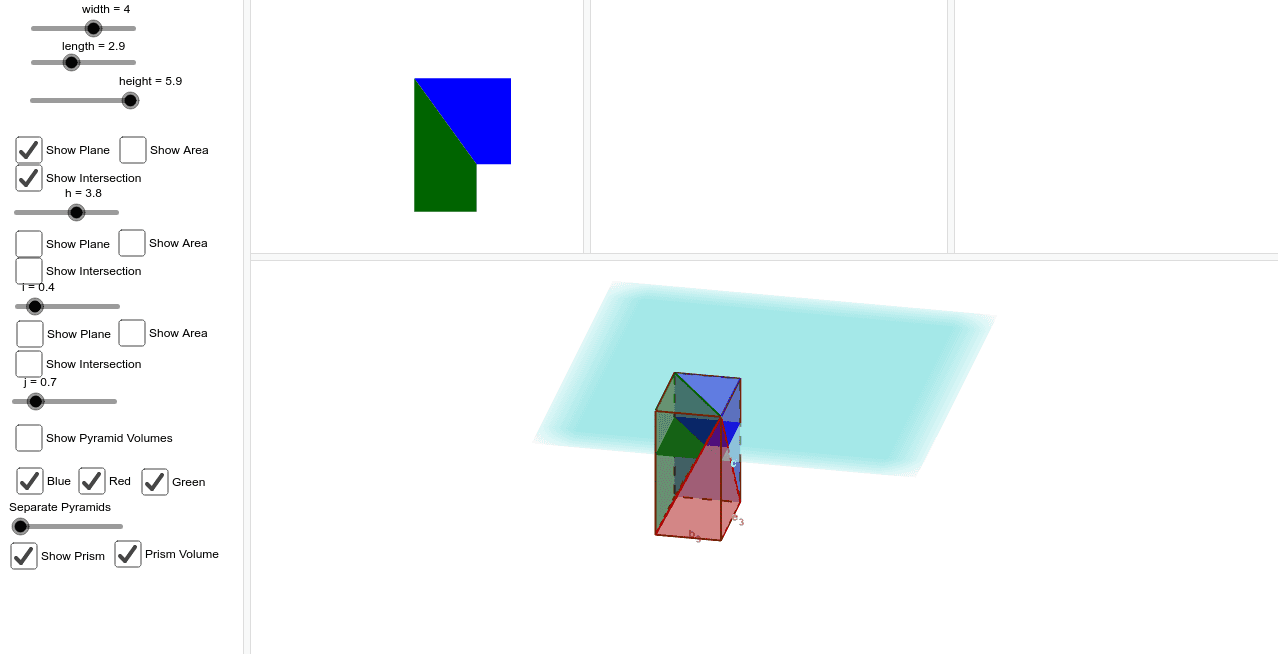
This example demonstrates how to trisect the volume of a rectangular prism through geometric constructions. It involves core concepts like volume calculation, similar triangles, and geometric transformations. GeoGebra commands and objects used include Pyramid, Plane, IntersectPath, PointIn, Volume, Point, Polygon, and Prism. Suitable for high school solid geometry instruction and exploration, helping students understand volume relationships and spatial constructions.
GeoGebra Commands & Parameters
Pyramid(G, F_2, D_2, C_2, A_2) → b, face1, edge5, edge6, edge7, edge8, face2, face3, face4, face5, edge1, edge2, edge3, edge4Pyramid(H, B_2, D_3, F, A_3) → d, face6, edge13, edge14, edge15, edge16, face7, face8, face9, face10, edge9, edge10, edge11, edge12Pyramid(E, B, D, C, A) → a, faceBDCE, edgeAE, edgeAB_1, edgeAD_1, edgeAC_1, faceABE, faceABD_1, faceACD_1, faceACE, edgeBE, edgeBD_1, edgeCD_1, edgeCEPlane(J, faceACE) → lIntersectPath(l, a) → poly4, poly6, i_1, j_1, p_1, q_1, V, W, Z, A_1, F_1, G_1, g_1, h_1IntersectPath(l, b) → poly5, poly7, m_1, n_1, r_1, s_1, B_1, C_1, D_1, E_1, H_1, I_1, k_1, l_1PointIn(faceABE) → PointfaceABEPointIn(faceACE) → PointfaceACEPointIn(poly5) → Pointpoly5_1PointIn(poly4) → Pointpoly4_1PointIn(poly5) → Pointpoly5_2PointIn(poly4) → Pointpoly4_2Volume(d) → volumedPoint(d) → Pointd_1Volume(b) → volumebPoint(b) → Pointb_1Volume(d) → o_1Point(d) → Pointd_2Volume(d) → l_2Point(d) → Pointd_3Volume(b) → m_2Point(b) → PointbVolume(a) → volumeaPoint(a) → PointaVolume(d) → n_2Point(d) → PointdPointIn(poly5) → Pointpoly5PointIn(poly4) → Pointpoly4Plane(I, face10) → cIntersectPath(c, b) → poly1, L, M, N, O, k, m, q, rIntersectPath(c, d) → poly2, poly3, a_1, b_1, c_1, d_1, P, Q, R, S, T, U, s, tPlane(K, face1) → e_1IntersectPath(e_1, d) → poly8, poly10, a_2, b_2, g_2, h_2, J_1, K_1, L_1, M_1, R_1, S_1, f_1, t_1IntersectPath(e_1, a) → poly9, poly11, e_2, f_2, i_2, j_2, N_1, O_1, P_1, Q_1, T_1, U_1, c_2, d_2Polygon(D, B, E, C) → poly12, d_3, b_3, e_3, c_3Prism(poly12, height) → u_2, V_1, edge17, edge18, edge19, edge20, edge21, edge22, edge23, edge24, W_1, Z_1, E_2, face11, face12, face13, face14, face15Volume(u_2) → volumeu2Point(u_2) → Pointu2PointIn(poly2) → Pointpoly2PointIn(poly1) → Pointpoly1PointIn(poly8) → Pointpoly8PointIn(poly9) → Pointpoly9
AI Drawing Prompt Reference
Draw a rectangular prism and trisect its volume. Start by creating the prism, then use geometric constructions to create planes and pyramids, find the intersection points using paths, calculate the volumes of each part, and finally display the trisected prism.
The prompt above was compiled from the original drawing commands and is for reference only.