
Trigonometric Ratios in a Circle by Eugene
Loading the math board and drawing, please wait…
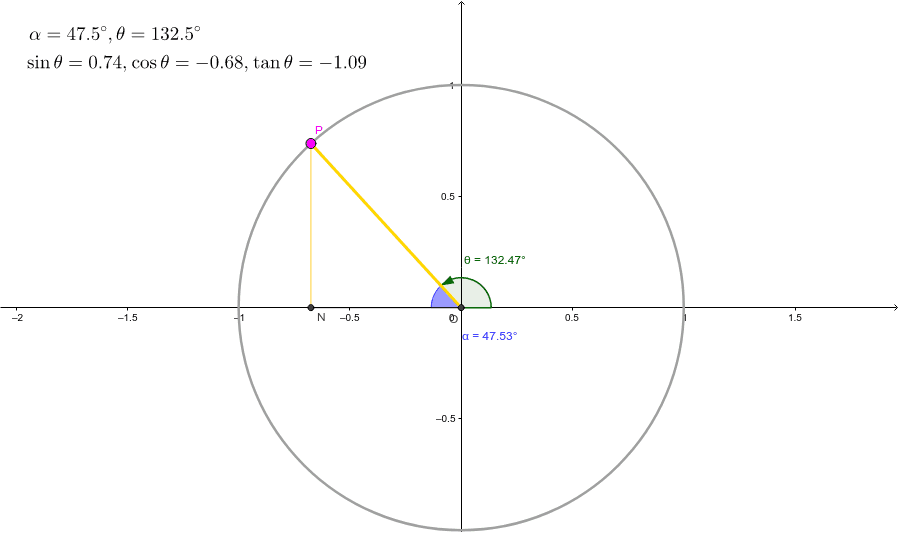
This example demonstrates the geometric definition of trigonometric function values through angle measurement and radius length within a circle. Key math concepts include circle, angle, trigonometry, vectors, geometric transformations, etc. GeoGebra commands/objects used in construction are Intersect, Point, Segment, Angle, OrthogonalLine, Distance, Line. Suitable for high school students learning trigonometric functions and analytical geometry.
GeoGebra Commands & Parameters
Intersect(xAxis, yAxis) → OPoint(c) → PSegment(O, P) → aIntersect(c, xAxis, 2) → AAngle(A, O, P) → θOrthogonalLine(P, xAxis) → dIntersect(d, xAxis) → DSegment(O, D) → eAngle(D, O, P) → αOrthogonalLine(P, xAxis) → gIntersect(g, e) → NSegment(P, N) → hDistance(O, P) → distanceOPDistance(N, P) → distanceNPDistance(O, N) → distanceONLine(P, e) → l
AI Drawing Prompt Reference
Draw a circle and mark a point on its circumference. Draw a line segment from the center of the circle to this point. Draw a perpendicular line from this point to the x-axis, marking the intersection point. Draw another perpendicular line from this point to the line segment from the center to the point on the circumference. Connect this intersection point to the point on the circumference. Measure the lengths of the radius, the line segment from the center to the intersection point, and the new line segment. Draw a line through the point on the circumference and the line segment from the center to the intersection point.
The prompt above was compiled from the original drawing commands and is for reference only.